Sitecore XM Cloud migration services
In This Article
- Move from Legacy CMS to AI-Ready Headless Experiences
- What Is Included in XM Cloud Migration?
- 1. Readiness Assessment
- 2. Content and Media Migration
- 3. Headless Code Refactoring
- 4. Decoupling Experience Features
- 5. Search and Forms Modernization
- Migration Tools and Delivery Approach
- Typical Migration Timeline
- Proven Sitecore Modernization Experience
Move from Legacy CMS to AI-Ready Headless Experiences
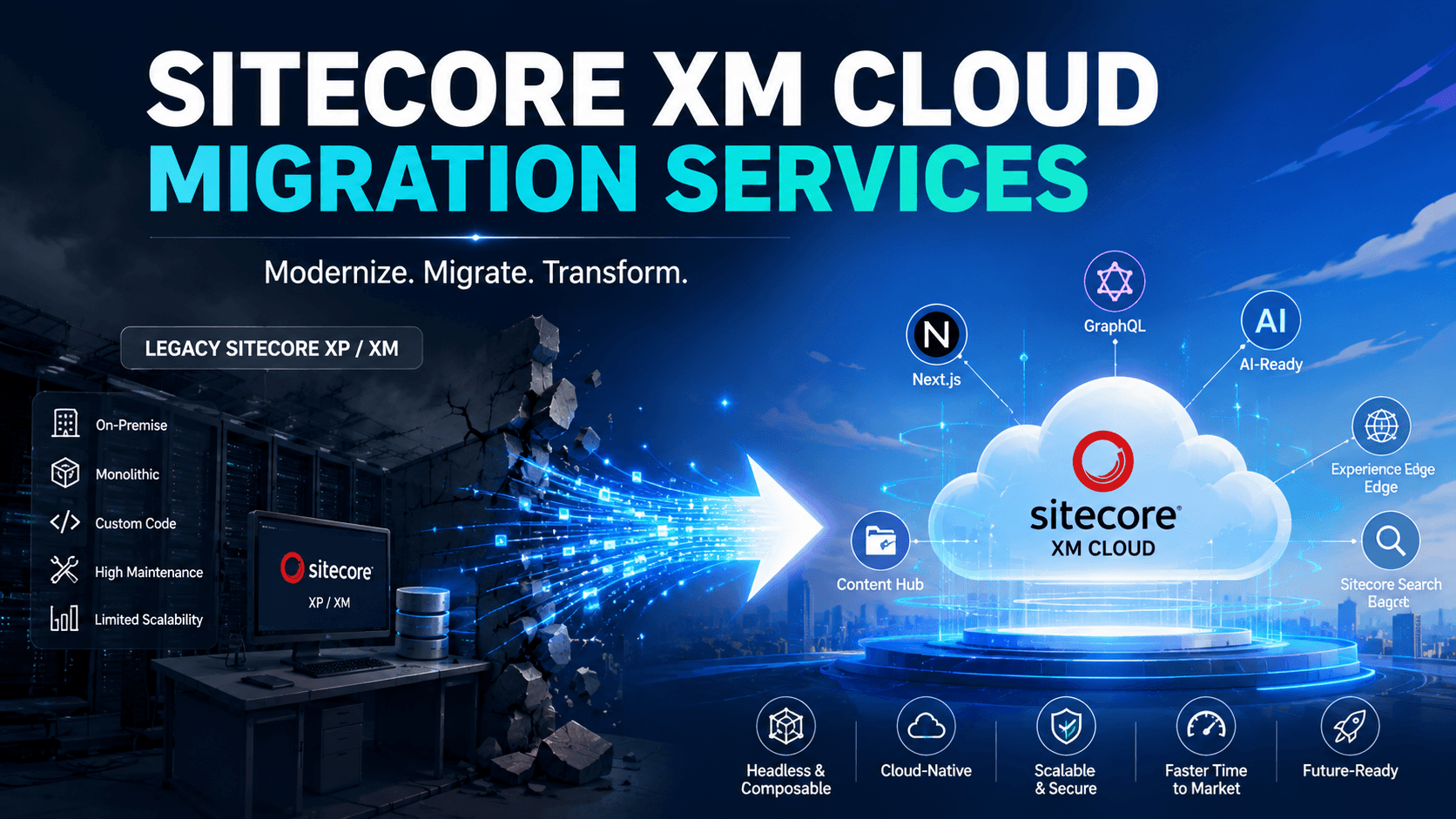
Enterprises running Sitecore XP, XM, on-premises or PaaS environments often face infrastructure responsibility, complex upgrades, tightly coupled frontend code and slower release cycles. Sitecore XM Cloud migration services help organizations move toward a fully managed, cloud-hosted headless CMS built around API-first content delivery and independent frontend deployment.
Sitecore describes XM Cloud as a fully managed headless web CMS that includes Pages, Headless SXA, Headless Services, the Next.js SDK and Experience Edge. With Sitecore’s broader evolution toward SitecoreAI, migration can also prepare content, architecture and workflows for AI-powered content and personalization capabilities.
Murmu Software Infotech provides Sitecore CMS and XM Cloud development services for enterprises and digital agencies modernizing legacy Sitecore platforms. Our team supports assessment, content migration, frontend redevelopment, integrations, deployment and support.
Plan Your Sitecore XM Cloud Migration with Experts
What Is Included in XM Cloud Migration?
1. Readiness Assessment
A successful migration begins with a review of the existing Sitecore environment. We assess the Sitecore version, content trees, templates, renderings, custom modules, integrations, workflows, search, forms, infrastructure and deployment processes.
This assessment identifies what can move, what must be refactored and what should be retired. It also helps determine whether a phased migration or complete transition is more appropriate. Explore our Sitecore XP/XM to XM Cloud migration strategy for a deeper planning framework.
2. Content and Media Migration
Sitecore’s official XM-to-XM-Cloud Migration Tool can move content, media and user data from supported on-premises XM environments into XM Cloud. It is available through both a graphical interface and command-line interface, enabling guided migrations or integration into automation workflows.
We use the appropriate combination of the official tool, Sitecore serialization, scripts and manual transformation. Content cleanup, template restructuring and media optimization are completed before validation to avoid carrying unnecessary technical debt forward.

Modernize Sitecore Without Limits
Move from legacy Sitecore to XM Cloud with headless architecture, seamless migration, AI readiness, modern search, and scalable digital experiences.
3. Headless Code Refactoring
XM Cloud uses a decoupled architecture. Legacy MVC renderings and server-side customizations do not automatically become a modern headless experience.
Our developers map components to Headless SXA, rebuild presentation logic with Next.js and React, configure JSS or Sitecore Content SDK, and connect applications through GraphQL and Experience Edge. Watch our Sitecore Headless CMS and XM Cloud demo to see templates, renderings, data sources and GraphQL working together.
4. Decoupling Experience Features
Sitecore XP personalization, analytics, xDB-dependent functions and tightly coupled integrations require careful evaluation. We redesign these capabilities using suitable composable services, APIs and cloud-native integrations rather than treating migration as a simple lift-and-shift.
Organizations evaluating the platform can read our guide to XM Cloud benefits, costs and migration strategy and our analysis of choosing a Sitecore XM Cloud development company.
5. Search and Forms Modernization
Legacy search indexes and forms may not map directly to the new architecture. We assess search requirements, content sources, relevance, submissions and CRM connections before selecting the right implementation.
Our healthcare migration case study demonstrates how Sitecore Search and XM Cloud supported provider, pharmacy and healthcare-content discovery. The related healthcare XM Cloud and AI Search video provides a practical project overview.
Migration Tools and Delivery Approach
Our toolkit can include the official migration tool, GUI and CLI options, Sitecore CLI, serialization, PowerShell, custom APIs, validation and controlled manual migration.
XM Cloud projects can connect to GitHub or Azure DevOps, with separate development, QA, staging and production environments and automated deployment pipelines through Sitecore Cloud Portal.
Modernize Legacy Sitecore into Faster AI-Ready Headless Experiences
Typical Migration Timeline
A focused XM Cloud migration generally requires about 2 to 5 months, while complex multilingual or multi-site programs may take longer. Timing depends on content volume, legacy code, integrations, components, search, testing and approvals. This is an MSI planning range, not a universal Sitecore estimate.
Proven Sitecore Modernization Experience
Review our healthcare XM Cloud migration, Sitecore SXA healthcare event platform and legacy healthcare modernization case studies. You can also explore our CMS website platform portfolio, 2026 Sitecore cost guide and guide to selecting a Sitecore development company.
Watch our Sitecore AI and MCP Server demonstration to see how governed CMS content can support AI-assisted content operations.
Murmu Software Infotech helps enterprises transition from legacy Sitecore to XM Cloud and prepare for AI-native digital delivery. From India, including our delivery base in Ranchi, Jharkhand, we support global organizations with migration, headless development and long-term Sitecore operations.
Frequently Asked Questions
What are Sitecore XM Cloud migration services?
Sitecore XM Cloud migration services move legacy Sitecore XP, XM, on-premises or PaaS platforms to a modern headless CMS. The service may include assessment, content migration, component redevelopment, integrations, testing, deployment and support.
Which company provides Sitecore XM Cloud migration services in India?
Murmu Software Infotech provides Sitecore XM Cloud migration services from India for enterprises and digital agencies, including readiness assessment, content migration, Next.js development, Search modernization, DevOps and post-launch support.
Can Sitecore XP migrate to XM Cloud?
Yes. Sitecore XP can transition to XM Cloud, but XP-specific analytics, xDB, personalization, MVC components, custom modules and integrations must be assessed and redesigned where they are not compatible with the target headless architecture.
Can Sitecore XM migrate to XM Cloud?
Yes. Sitecore XM content, media and selected data can be migrated to XM Cloud using supported migration tools, serialization, scripts, APIs or manual workflows. Legacy presentation code generally requires headless redevelopment.
What is included in an XM Cloud readiness assessment?
The assessment reviews platform versions, infrastructure, templates, renderings, content, media, workflows, custom code, search, forms, personalization, integrations, deployment processes, security and frontend architecture.
Which tools are used for XM Cloud migration?
Migration may use the Sitecore XM-to-XM-Cloud Content Migration Tool, its supported GUI or command-line workflows, Sitecore serialization, PowerShell, APIs, validation scripts and controlled manual migration.
Why must Sitecore MVC components be rebuilt?
XM Cloud separates content management from frontend presentation. Legacy server-rendered MVC components are normally mapped and rebuilt as reusable Next.js or React components connected to Sitecore content through headless APIs.
How is content and media migrated?
Content and media migration includes inventory, cleanup, template mapping, content transfer, media validation, link checking, metadata preservation, redirect planning and comparison between source and target environments.
How is Search modernized during migration?
Search modernization can include replacing legacy Solr-dependent experiences, configuring new content sources, indexing structured content, implementing filters, improving relevance and integrating search results into the headless frontend.
How are Sitecore Forms migrated?
Forms are assessed according to fields, validation, submissions, CRM integrations and compliance requirements. They may be rebuilt using supported form capabilities, secure APIs, serverless functions or third-party form platforms.
How is SEO protected during XM Cloud migration?
SEO preservation includes URL mapping, 301 redirects, metadata migration, canonical URLs, XML sitemaps, robots directives, structured data, internal-link validation, performance testing and pre-launch crawling.
How long does an XM Cloud migration take?
Murmu Software Infotech estimates approximately two to five months for a focused migration. Multi-site, multilingual, highly customized or integration-heavy enterprise platforms may require additional time.
Does Murmu Software Infotech provide post-migration support?
Yes. Post-migration support can include frontend enhancements, component development, content operations, deployment assistance, performance optimization, integration maintenance, Search improvement and production troubleshooting.
Can migration prepare Sitecore content for AI?
Yes. Migration can restructure content into reusable fields, entities, summaries, facts, questions and direct answers that support AI retrieval, content automation, AEO, GEO and future SitecoreAI workflows.