Sanity CMS
10 Practical ChatGPT Prompts for Sanity CMS Content Teams
AAyush Kumar8 Min Read
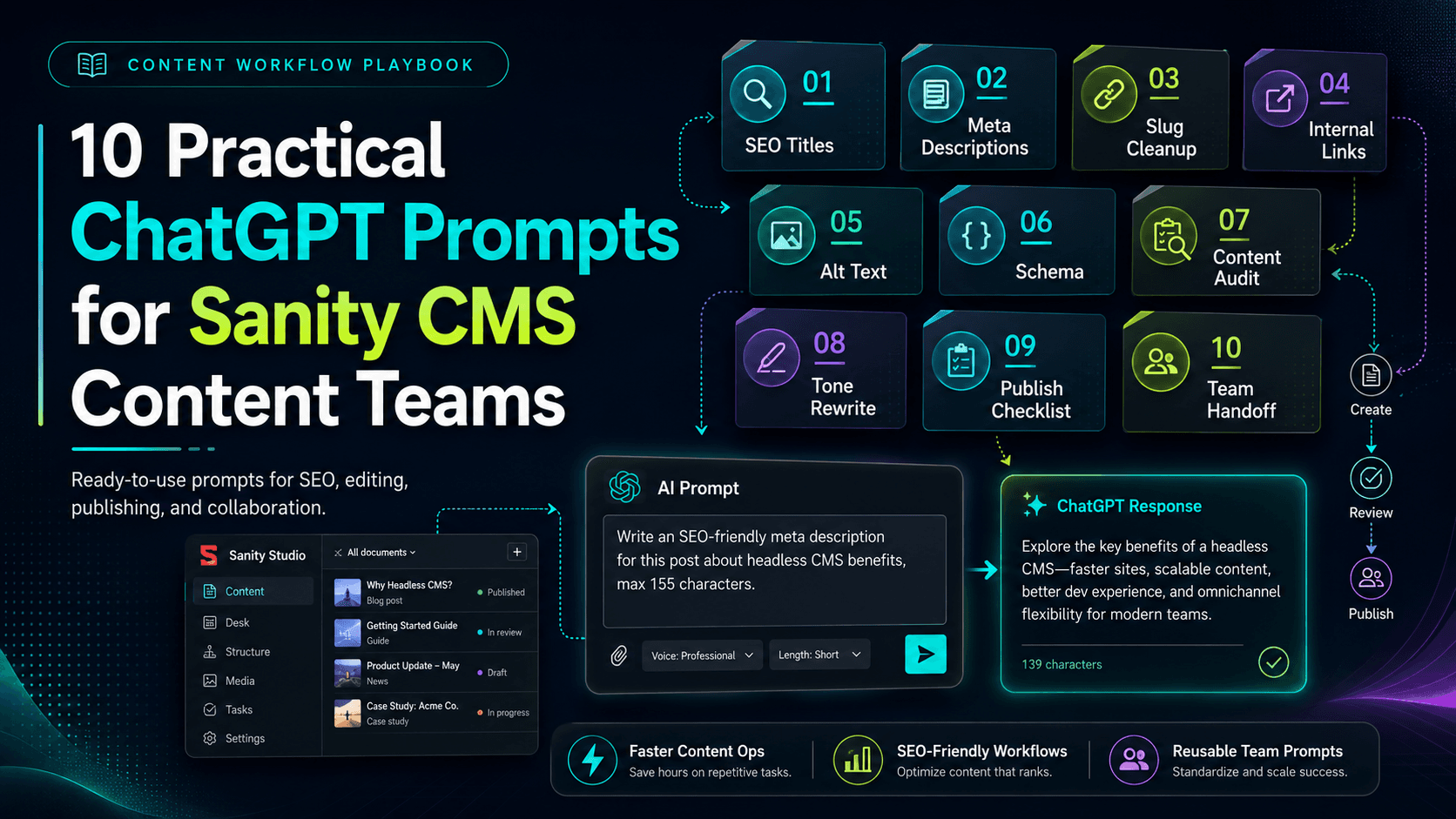
Content teams often know what they want from Sanity CMS but not the exact GROQ query, document structure or sequence of checks required to get there. When ChatGPT is connected to an authorized Sanity project, a clear natural-language prompt can turn that editorial goal into a focused content operation.
The quality and safety of the result depend heavily on the prompt. A useful request should identify the project context, dataset, document type, content perspective, expected output and whether changes are allowed.
This guide provides ten practical, copy-ready prompts for common Sanity CMS tasks. Replace the values inside square brackets with your actual project details before using them.
Use read-only prompts first
Start with reporting and analysis. Review the result before asking ChatGPT to create, patch, publish or delete anything.
A strong Sanity prompt usually contains six elements:
For example, “check my blogs” is vague. A safer version is: “In the [production] dataset, inspect published post documents and return the ID, title and slug of posts missing a meta description. Report only; do not modify anything.”
Use this prompt when you need a clear overview of what exists in a dataset before starting an audit, migration or editorial plan.
“In the [production] dataset, inspect published documents and create a content inventory grouped by document type. For each type, show the document count, the latest update date and three example titles. Report only. Do not create, update, publish, unpublish or delete anything.”
It explicitly requests published content, limits the sample and prohibits all write actions.
Use this before an editorial meeting or publishing session to identify unfinished work and unpublished changes.
“In the [production] dataset, list all post drafts. Show the draft ID, title, slug, author, last updated time and whether a published version exists. Sort by most recently updated. Do not publish or modify any document.”
“Group these drafts by author and mark drafts not updated in the last [30] days. Keep the task read-only.”
Use this to identify published pages that may have incomplete search or social metadata.
“Inspect the current post schema first. Then audit published post documents in the [production] dataset for missing title, slug, meta title, meta description, main image, Open Graph fields, Twitter fields, canonical configuration and robots settings. Return the document ID, title, slug and exact missing fields. Report only and do not change content.”
“Group the findings into critical, high, medium and optional priorities. Explain the priority without editing any document.”
Use this when content has grown quickly, multiple editors publish independently or a migration may have introduced duplicate values.
“In the [production] dataset, inspect all post documents and identify duplicate slug values, exact duplicate titles, duplicate meta titles and duplicate meta descriptions. Group matching documents together and include their IDs, publication status and last updated dates. Do not make changes.”
A duplicate report does not automatically mean one article should be removed. Editors must compare search intent, audience and page purpose before merging or redirecting content.
Use this to plan content refreshes around older articles, changing products, outdated screenshots or time-sensitive claims.
“Find published post documents whose lastReviewedAt date is missing or older than [six months]. Return the ID, title, slug, author, publishedAt, lastReviewedAt, category and any year mentioned in the title. Sort the oldest review date first. Report only.”
“For the first [10] results, summarize the main topic and list factual statements that appear time-sensitive. Do not rewrite or update the posts.”
Use this when navigation feels inconsistent, filters do not behave as expected or editors suspect broken document relationships.
“Audit published post documents in the [production] dataset for missing categories, unresolved category or subcategory references, subcategories that do not belong to the selected parent category, empty tags and inconsistent tag capitalization. Return the document ID, title, current values and issue. Do not patch any reference.”
Structured references should use verified document IDs. ChatGPT should never invent or guess category IDs while fixing taxonomy.
Use this after the topic, author, audience and editorial direction are approved.
“Create one English blog draft titled ‘[TITLE]’ in the [production] dataset. First inspect the complete post schema and review relevant existing posts, categories and image assets. Use author ‘[AUTHOR]’. Fill every applicable content, FAQ, SEO, social and AI-search field. Check that the slug is unique. Create a draft only—do not publish it, do not modify existing documents and verify the new draft after creation.”
Use this when specific drafts have weak or missing metadata and the exact documents have already been approved for editing.
“For only these draft IDs: [ID 1], [ID 2] and [ID 3], read the title and body and propose a meta title, meta description, Open Graph title, Open Graph description, Twitter title and Twitter description. Show the proposed values first. Do not write them until I approve, and do not change any other fields.”
“Apply exactly the approved values to those three draft IDs using their current revisions. Change no other fields, keep them as drafts and query the documents afterward to verify the update.”
Use this during editorial planning to understand which questions are already covered and where the site may need supporting articles.
“Analyze published posts in the [Sanity CMS] category. Group them into topic clusters, summarize the search intent covered by each cluster and identify useful questions that are not answered by any existing post. Cite the existing titles used for your analysis. Do not create new documents.”
“Rank the proposed topics by audience value, relevance to our services and how naturally they can link to existing posts. Keep this as a planning report.”
Use this immediately before an editor decides whether a draft is ready to publish.
“Perform a read-only pre-publish review of draft [DRAFT ID]. Inspect the current post schema and check required fields, title and slug, category references, author, dates, body structure, image references, SEO metadata, social metadata, canonical URL, robots settings, FAQs, direct answers and AI-search fields. Return Pass, Warning or Fail for each check with a short explanation. Do not modify or publish the document.”
Passing the checklist should not automatically publish the document. Publishing is a distinct, high-impact action that should be explicitly requested after review.
The examples are intentionally specific, but teams should adjust them for their schema and workflow.
You can add this sentence to many Sanity prompts:
“Report the result first. Do not create, patch, publish, unpublish, delete or change project settings unless I explicitly approve the exact action and target documents.”
This suffix does not replace permissions, but it makes the conversational boundary clear and reduces ambiguity.
ChatGPT can help Sanity CMS content teams move faster when prompts define the target, scope, perspective, output and allowed actions. The best prompts are not merely descriptive—they create an operational boundary.
Begin with content inventories and audits, review the results and introduce controlled draft operations only where they add value. With schema inspection, verified references and explicit approval points, conversational content management can remain both practical and safe.
Murmu Software Infotech can help your team combine Sanity CMS, Next.js and AI-assisted content operations with practical governance and review controls.
Yes. With an authorized Sanity connection, ChatGPT can inspect schemas, query documents and support controlled content operations according to the permissions available to the connected account.
Specify the project context, dataset, workspace when relevant, document type, perspective, exact task, expected output and actions that are not permitted.
Yes, whenever the request is intended only for analysis or reporting. This makes the boundary clear and prevents a read-only task from becoming a write operation.
Yes. It can inspect the post schema, use verified references, prepare structured body content and fill SEO, social, FAQ and AI-search fields, provided the connection has suitable write permission.
Publishing may be supported when the connection has permission, but it should remain a separate, explicit action after human review.
Request a read-only report first, review the affected document IDs, approve a small batch, use revision guards and verify every updated document afterward.