Create Templates in Sitecore, including data types (field types), insert options, and standard values
In This Article
- 1. What is a Template in Sitecore?
- 2. Template Structure (Core Parts)
- 3. Template Field Types (Data Types)
- Link & Reference Fields
- Media Fields
- Advanced / Special Fields
- 4. Insert Options
- What are Insert Options?
- How Insert Options Work
- Key Use Cases
- 5. Standard Values
- What are Standard Values?
- What You Can Do with Standard Values
- Example
- Inheritance via Standard Values
- Quick Summary
- Pro Tips
1. What is a Template in Sitecore?
A Template defines the structure of content items in Sitecore—similar to a class in programming.
It controls:
- What fields an item has
- What kind of data each field stores
- Default behavior and rules
Example: A “Blog Post” template might include fields like:
- Title
- Body
- Author
- Publish Date
Build Smarter Sitecore Content Structures
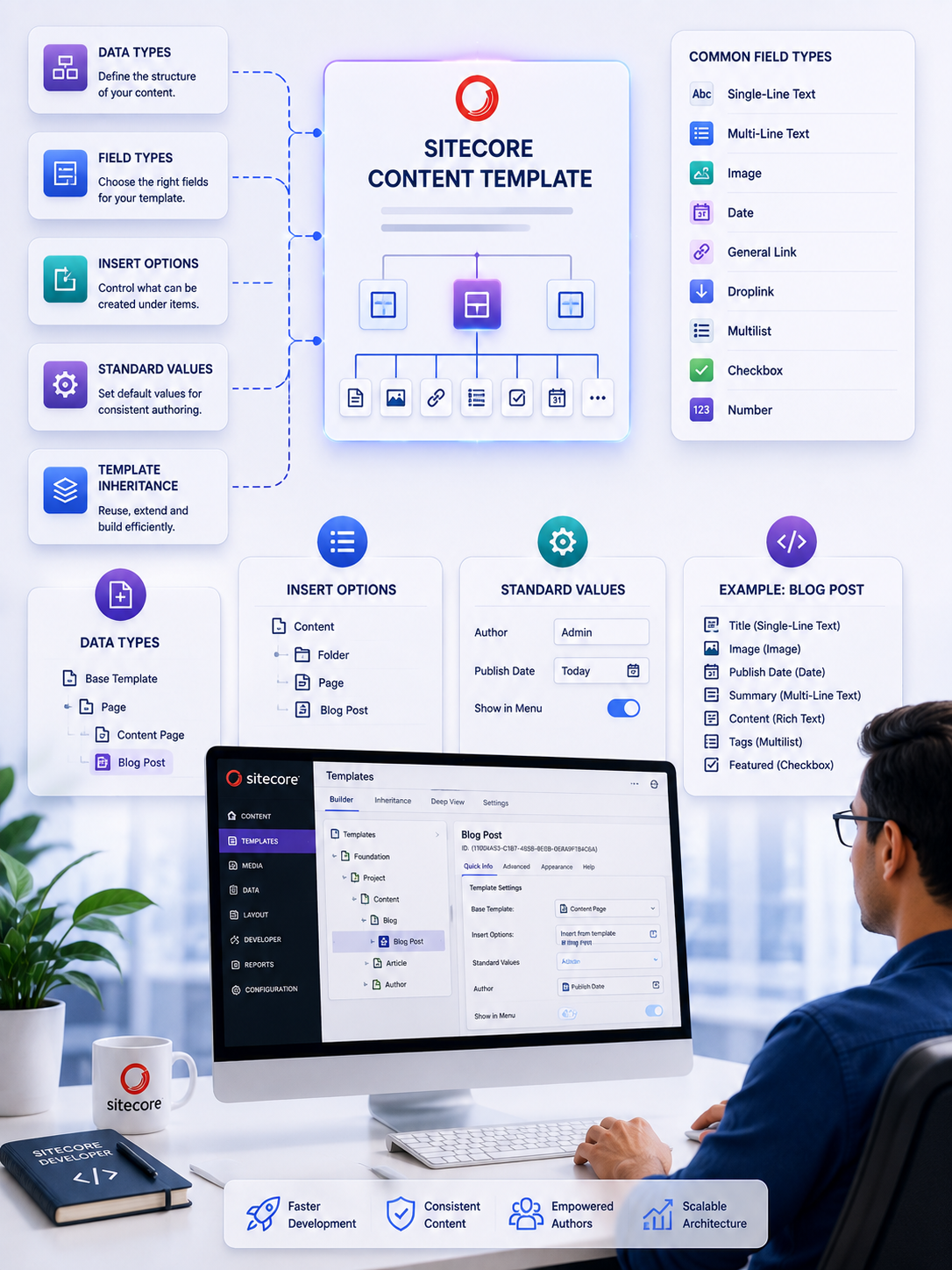
Master Sitecore templates, field types, insert options, and standard values to create cleaner content models, consistent authoring experiences, and scalable CMS architectures.
2. Template Structure (Core Parts)
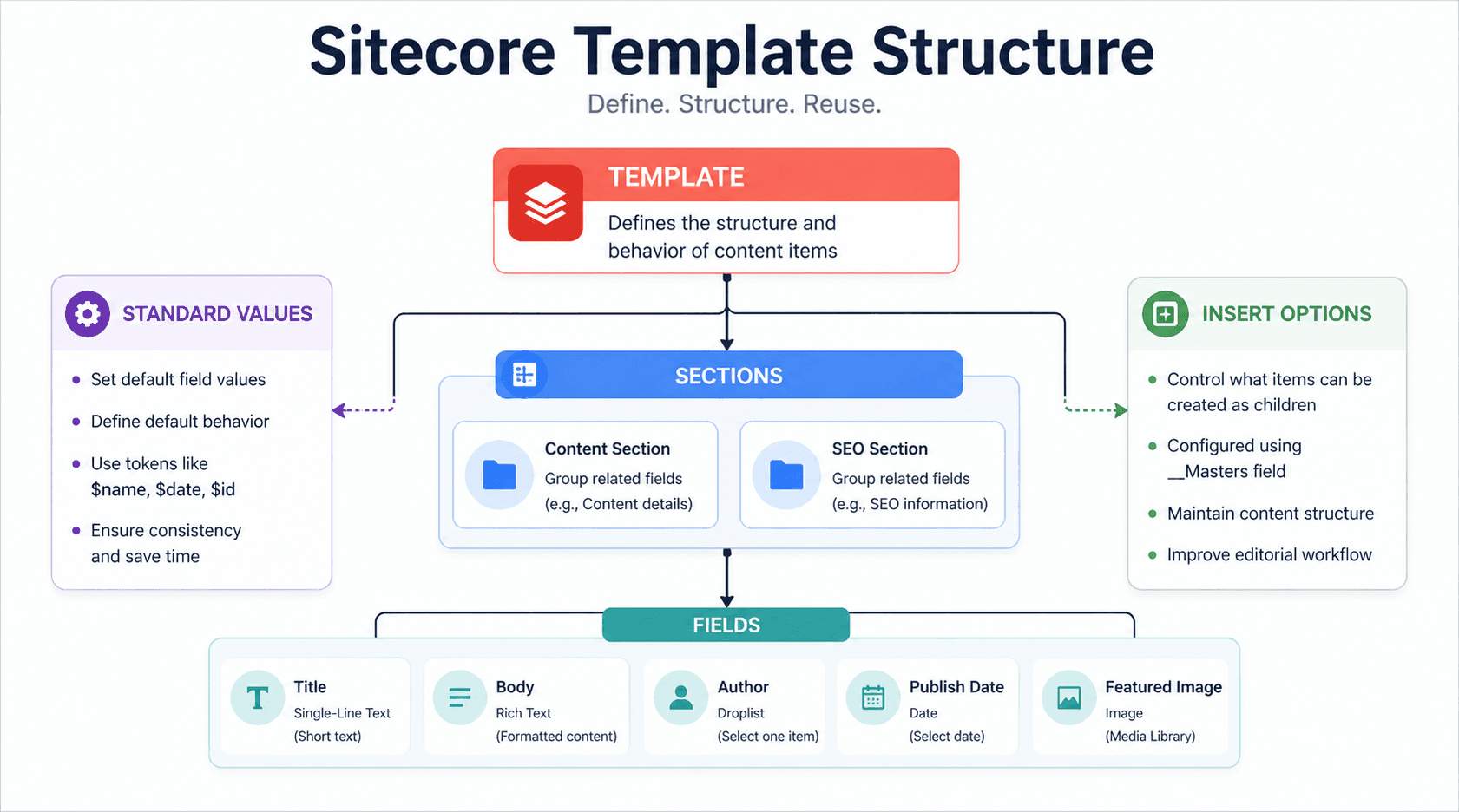
A Sitecore template is made up of:
- Sections → Logical grouping of fields (e.g., “Content”, “SEO”)
- Fields → Individual data elements
- Standard Values → Default values
- Insert Options → What can be created under an item
3. Template Field Types (Data Types)
Field types define what kind of data is stored and how it is edited.
- Common Field Types
- Text-Based Fields
Number & Date Fields
- Number → Numeric values
- Integer → Whole numbers
- Date /Datetime → Calendar-based input
Link & Reference Fields
Simplify Content Architecture with Smart Sitecore Templates
- General Link → Internal/external links
- Droplink /Droplist → Select one item
- Multilist /Treelist → Select multiple items
- Checklist → Multi-select checkboxes
Media Fields
- Image → Store images from Media Library
- File → PDFs, docs, etc.
Advanced / Special Fields
- Checkbox → True/False
- Name Value List → Key-value pairs
- Rules → Conditional logic
- Password → Encrypted value
4. Insert Options
What are Insert Options?
Insert options control what types of items can be created as children under a specific item.
Example:
If you have a Folder template, you might allow:
- Blog Post
- News Article
- Landing Page
This ensures content structure consistency.
How Insert Options Work
Insert options are configured via:
- __Masters field (standard way)
- Insert Options section in Standard Values
Key Use Cases
- Restrict content authors to valid structures
- Improve editorial workflow
- Maintain clean content hierarchy
5. Standard Values
What are Standard Values?
Standard values define default values andbehavior for all items created from a template.
What You Can Do with Standard Values
- Set default field values
- Define insert options
- Use tokens like:
- $name → Item name
- $date → Current date
- $id → Unique ID
Example
If “Author” field has a standard value:
Admin
Every new item will default to Admin unless changed.
Inheritance via Standard Values
Templates can inherit from other templates, and standard values can cascade.
Quick Summary
| Concept | Purpose |
|---|---|
| Template | Defines structure of content |
| Field Types | Define type of data stored |
| Insert Options | Control allowed child items |
| Standard Values | Provide defaults & behavior |
Pro Tips
- Keep templates modular and reusable
- Use base templates for shared fields
- Avoid overusing complex field types unless needed
- Use standard values for consistency and speed
Happy Coding!
Frequently Asked Questions
What is a template in Sitecore?
A Sitecore data template defines the structure and behavior of content items by specifying their fields, field types, sections, and inherited templates.
How do you create a data template in Sitecore?
A data template can be created and edited using the Sitecore Template Manager or Template Builder in the Content Editor. You define sections, fields, field types, inheritance, standard values, and other template settings.
What are field types in Sitecore?
Sitecore field types define the kind of data a field stores and the editing interface presented to content authors. Examples include Single-Line Text, Rich Text, Image, Date, General Link, Droplink, Multilist, Checkbox, and Number.
What are standard values in Sitecore?
Standard Values are special items associated with data templates that can define default field values, default settings, presentation details, and insert options for items created from the template.
What are insert options in Sitecore?
Insert options control which types of items users can create underneath an existing item. They help enforce valid content structures and make content authoring easier by showing relevant item types.
What is the difference between Sitecore templates and standard values?
A Sitecore template defines the structure of an item, including its fields and field types, while standard values provide default values and settings for items created from that template.
How does template inheritance work in Sitecore?
Sitecore templates can inherit fields from base templates. Template inheritance lets developers create reusable groups of shared fields and then extend them across multiple content templates.
Which field types are commonly used in Sitecore?
Common Sitecore field types include Single-Line Text, Multi-Line Text, Rich Text, Image, Date, DateTime, Number, Checkbox, General Link, Droplink, Droplist, Multilist, Treelist, and File.
How do standard values improve Sitecore content modeling?
Standard values improve consistency by providing default field values and settings when content items are created. They can also define insert options and other default behavior.
What are Sitecore standard value tokens?
Standard value tokens are dynamic placeholders such as $name, $id, and time-related tokens that Sitecore can replace when an item is created, allowing default values to be generated automatically.