MCP Server Development Services
In This Article
- Build AI That Connects With Your Business Systems
- What Is an MCP Server?
- Why Businesses Need MCP Server Development
- MCP Server vs Normal API Integration
- Our MCP Server Development Approach
- 1. AI Use Case Discovery
- 2. System and API Mapping
- 3. MCP Tool Design
- 4. Backend Development and Integration
- 5. Security, Authentication, and Testing
- Real Business Use Cases for MCP Servers
- AI Stock Research Platform
- AI Chatbot With Human Support
- AI-Powered Headless CMS
- Who Should Build a Custom MCP Server?
- MCP + Agentic AI: The Future of Business Automation
- Final Thoughts
Build AI That Connects With Your Business Systems
Artificial Intelligence is moving from simple chat responses to real business execution. Enterprises, startups, SaaS platforms, healthcare systems, financial tools, CMS platforms, and customer support teams no longer need AI that only answers questions. They need AI that can securely connect with tools, databases, APIs, documents, CRM, CMS, ERP, and internal workflows.
That is where MCP server development services become important.
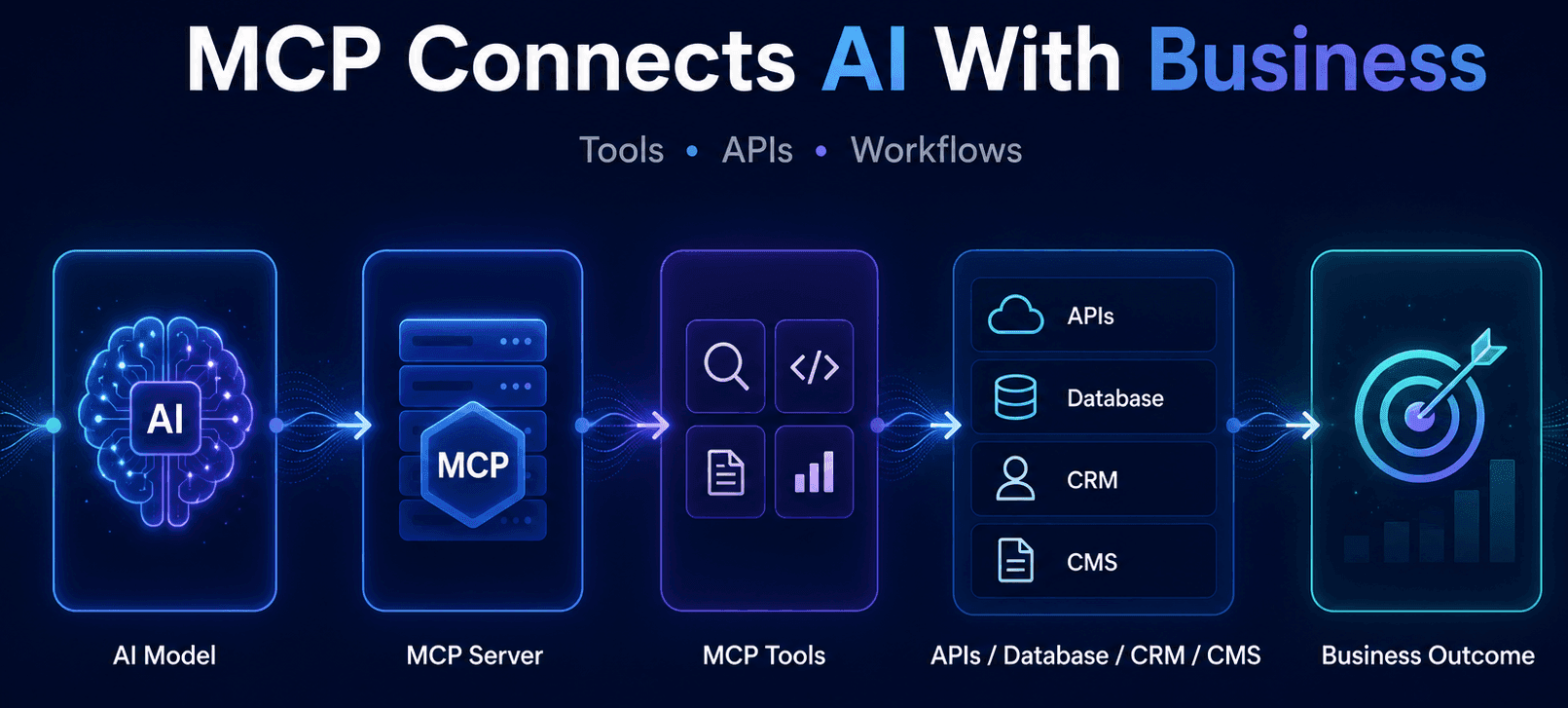
MCP, or Model Context Protocol, is becoming a powerful standard for connecting AI agents and LLMs with external systems. Instead of building one-off integrations for every AI model or chatbot, an MCP server creates a structured bridge between AI and your business tools.
In simple terms:
AI Prompt → MCP Server → Business Tools / APIs / Database → Structured Result → AI Response
At Murmu Software Infotech, we build MCP Server Solutions that help businesses connect AI models such as Claude, OpenAI, Gemini, and agentic AI systems with real workflows, business logic, and data sources.
What Is an MCP Server?
An MCP server is a backend service that exposes tools, data, and prompts to AI clients in a standardized way. The official MCP documentation explains that MCP servers can provide three main capabilities: resources, tools, and prompts. Resources are readable data, tools are callable functions, and prompts are templates that help users complete specific tasks.
For example, an MCP server can allow an AI assistant to:
- Search a company knowledge base
- Read customer data from CRM
- Fetch stock market data from financial APIs
- Generate CMS content summaries
- Check hospital appointment records
- Trigger lead qualification workflows
- Update support ticket status
- Query an internal database
- Run business rules before answering
This is the difference between a chatbot and an AI-powered business system.
A chatbot only talks.
An MCP-powered AI assistant can use tools.
Why Businesses Need MCP Server Development
Many companies already have APIs, databases, dashboards, and internal tools. The problem is that AI agents cannot automatically understand how to use them safely and correctly.
Without MCP, teams often rely on manual copy-paste workflows. A user copies data from a CRM, pastes it into a prompt, waits for an answer, and then manually updates another system. Boldare describes this problem clearly: without MCP, AI agents often stop mid-task and wait for humans to paste missing data; with MCP, agents can query systems directly and continue the task using real data.
With a custom MCP server, your AI system can:
- Access approved business data securely
- Call backend functions when needed
- Use tools based on user intent
- Follow defined business rules
- Return structured outputs
- Reduce repetitive manual work
- Support agentic AI workflows
- Integrate with future AI clients more easily
This makes MCP highly useful for enterprises building AI-powered applications, internal copilots, customer support assistants, financial research tools, healthcare systems, and AI-native CMS workflows.
MCP Server vs Normal API Integration
A normal REST API is designed for applications and developers. An MCP server is designed for AI agents and LLM-based workflows.
Your existing REST API may expose endpoints like:
1.customers
2. orders
3. appointments
4. reports
5. portfolio
But an AI model needs more than endpoints. It needs to know:
- What the tool does
- When to use it
- What parameters are required
- What output format to expect
- What actions are allowed
- What errors mean
- What security rules apply
That is why MCP tool design is critical. Boldare also notes that connecting an API to MCP is only part of the work; writing tool definitions that agents can use correctly is where many implementations fail.
Connect Your Business Tools With Intelligent AI Systems
Our MCP Server Development Approach
At Murmu Software Infotech, we approach MCP server development as a business workflow project, not just an AI experiment.
Our process includes:
1. AI Use Case Discovery
We first identify where MCP will create value. Not every workflow needs MCP. Some use cases can be solved with normal APIs, RAG, or chatbot logic. MCP is best when AI needs to call multiple tools, access live data, follow rules, or trigger workflows.
For businesses exploring AI ideas, our AI Solutions Development service helps define the right roadmap.
2. System and API Mapping
We map your existing systems such as CRM, CMS, ERP, databases, financial APIs, healthcare systems, support tools, or internal software. This helps define what should be exposed to AI and what should stay restricted.
3. MCP Tool Design
We design tool definitions with clear input parameters, output schemas, error handling, role-based access, and business rules.
Example MCP tools may include:
Search_knowledge_baseQualify_leadGet_customer_profileGenerate_quote_estimateAnalyze_stockReview_portfolio_riskFetch_appointment_summaryCreate_support_ticketGenerate_content_summary
4. Backend Development and Integration
We build the MCP server and connect it with APIs, databases, services, or workflows. Depending on the project, we may use Python FastAPI, Node.js, Next.js APIs, .NET, PostgreSQL, vector databases, or cloud infrastructure.
5. Security, Authentication, and Testing
OpenAI’s MCP documentation highlights the importance of authorization and authentication when building custom remote MCP servers, especially when connecting AI to private data sources. It also warns developers to avoid exposing sensitive information in tool definitions.
For production systems, we focus on access control, logging, rate limits, validation, safe prompts, audit trails, and controlled tool execution.
Turn AI Assistants Into Real Workflow Automation
Real Business Use Cases for MCP Servers
AI Stock Research Platform
We used MCP-style tool orchestration in our AI-Powered Stock Research & Analysis Platform Case Study. The platform was built for Indian stocks and sector analysis using MCP tools, Claude AI, OpenAI, financial APIs, FastAPI, and Next.js.
The user simply asks a question like “Analyze Reliance” or “Review my portfolio risk.” The backend detects intent, runs the right tools, applies rules, and generates structured insights.
AI Chatbot With Human Support
For sales and customer engagement, we developed a Custom AI Chatbot with Gemini + OpenAI. MCP-style workflows can make chatbots more powerful by connecting them with CRM, service data, meeting booking, lead qualification, and human handoff.
AI-Powered Headless CMS
In our AI-powered Sanity + Next.js headless CMS case study, AI content agents, multilingual workflows, SEO/GEO/AEO summaries, and CMS automation show how MCP-like integrations can turn CMS platforms into AI-native content systems.
Who Should Build a Custom MCP Server?
MCP server development is useful for:
- SaaS companies building AI copilots
- Enterprises integrating AI with internal tools
- Healthcare platforms needing AI workflow support
- Financial platforms building AI research tools
- CMS-driven businesses creating AI content operations
- Customer support teams automating ticket workflows
- Sales teams building AI Sales SDR systems
- Agencies building white-label AI platforms
- Startups building AI-powered MVPs
If your AI assistant needs to access tools, retrieve private data, call APIs, or complete business tasks, MCP may be the right architecture.
MCP + Agentic AI: The Future of Business Automation
MCP becomes even more powerful when combined with Agentic AI Systems. Agentic AI can understand intent, plan steps, use tools, validate results, and generate structured outcomes.
For example:
User asks: “Prepare a sales follow-up summary for this lead.”
AI detects intent: Sales follow-up
MCP tools run: CRM lookup, conversation history search, service recommendation, meeting scheduler
Output: Follow-up summary + next action suggestion
That is the shift from AI chat to AI execution.
Final Thoughts
MCP server development is becoming a critical layer for businesses that want AI to work with real systems, not just generate text.
The companies that win with AI will not only adopt LLMs. They will connect AI with tools, workflows, APIs, knowledge, and business rules.
At Murmu Software Infotech, we build MCP servers, AI-powered applications, custom AI chatbots, generative AI systems, and workflow-connected AI platforms for businesses that want practical automation and measurable outcomes.
Explore our related services:
- AI-Powered Application Development
- Custom AI Chatbot Services
- Generative AI Solutions
- MCP Server Solutions
If you are planning to connect AI with your CRM, CMS, ERP, database, internal tools, or customer-facing platform, this is the right time to explore MCP.
Build AI that does more than answer. Build AI that connects, acts, and delivers outcomes.
Frequently Asked Questions
What is MCP server development?
MCP server development is the process of building Model Context Protocol servers that allow AI models and AI agents to securely connect with business tools, APIs, databases, prompts, resources, and workflows. It helps AI systems retrieve data, call tools, apply business logic, and generate structured outputs.
Does Murmu Software Infotech provide MCP server development services?
Yes. Murmu Software Infotech provides MCP server development services for businesses that want to connect AI models, AI assistants, and agentic AI systems with APIs, databases, CRM, CMS, ERP, internal tools, and custom workflows.
How does an MCP server help AI applications?
An MCP server helps AI applications access approved tools and business data in a structured way. Instead of only generating text, the AI can call functions, retrieve information, run backend workflows, and return useful business outcomes.
What are MCP tools?
MCP tools are callable functions exposed by an MCP server. These tools can perform specific actions such as searching a knowledge base, checking customer data, analyzing financial data, creating reports, qualifying leads, updating records, or triggering workflows.
Can MCP servers work with Claude, OpenAI, and Gemini?
Yes. MCP servers can be designed to support AI models and AI clients such as Claude, OpenAI-based systems, Gemini-based applications, and custom agentic AI platforms depending on the integration architecture.
Can MCP servers integrate with enterprise systems?
Yes. MCP servers can integrate with CRM, CMS, ERP, databases, APIs, support tools, healthcare systems, financial services, internal software, knowledge bases, and cloud platforms to enable workflow-connected AI automation.
How is MCP different from a normal API integration?
A normal API is usually designed for applications and developers. An MCP server is designed for AI agents and LLM workflows. It describes tools, inputs, outputs, context, and safe usage patterns so AI systems can call tools more effectively.
What are common MCP server use cases?
Common MCP server use cases include AI chatbots, AI Sales SDR assistants, AI copilots, customer support automation, CMS content automation, financial research platforms, healthcare AI assistants, internal knowledge search, reporting tools, and agentic workflow automation.
What technologies are used for MCP server development?
MCP server solutions can be built using Python FastAPI, Node.js, TypeScript, Next.js, PostgreSQL, REST APIs, vector databases, OpenAI, Claude, Gemini, authentication systems, logging, cloud infrastructure, and custom backend services.
Why choose Murmu Software Infotech for MCP server development?
Murmu Software Infotech combines AI engineering, MCP server development, API integration, custom software development, enterprise CMS experience, and full-stack product development to build practical MCP-powered AI systems for real business workflows.