__Standard Values in Sitecore
In This Article
- What is __Standard Values in Sitecore?
- What does it do?
- 1. Provides Default Field Values
- 2. Enables Fallback Behavior
- 3. Stores Presentation Details
- 4. Supports Token Replacement
- Where is it located?
- Example (Real-world Scenario)
- __Standard Values setup
- What happens when you create a new item?
- Fallback Example
- Presentation Details Example
- Why is it important?
- Developer Perspective
- Common Use Cases
- Important Notes
- Quick Analogy
In Sitecore, the __Standard Values item is one of those things that seems simple at first, but ends up being central to how Sitecore manages defaults, templates, and behavior.
Let’s break it down clearly and then walk through a practical example.
What is __Standard Values in Sitecore?
Every template in Sitecore can have a special item called:
__Standard Values
It acts as a default configuration + fallback layer for all items created from that template.
Think of it like:
- A blueprint
- A default settings file
- A base version of an item

Build Consistent Sitecore Experiences
Simplify Sitecore development with smart defaults, fallback behavior, reusable presentation details, and scalable templates that keep every content experience consistent.
What does it do?
1. Provides Default Field Values
When you create a new item from a template:
- If a field is empty → Sitecore pulls value from __Standard Values
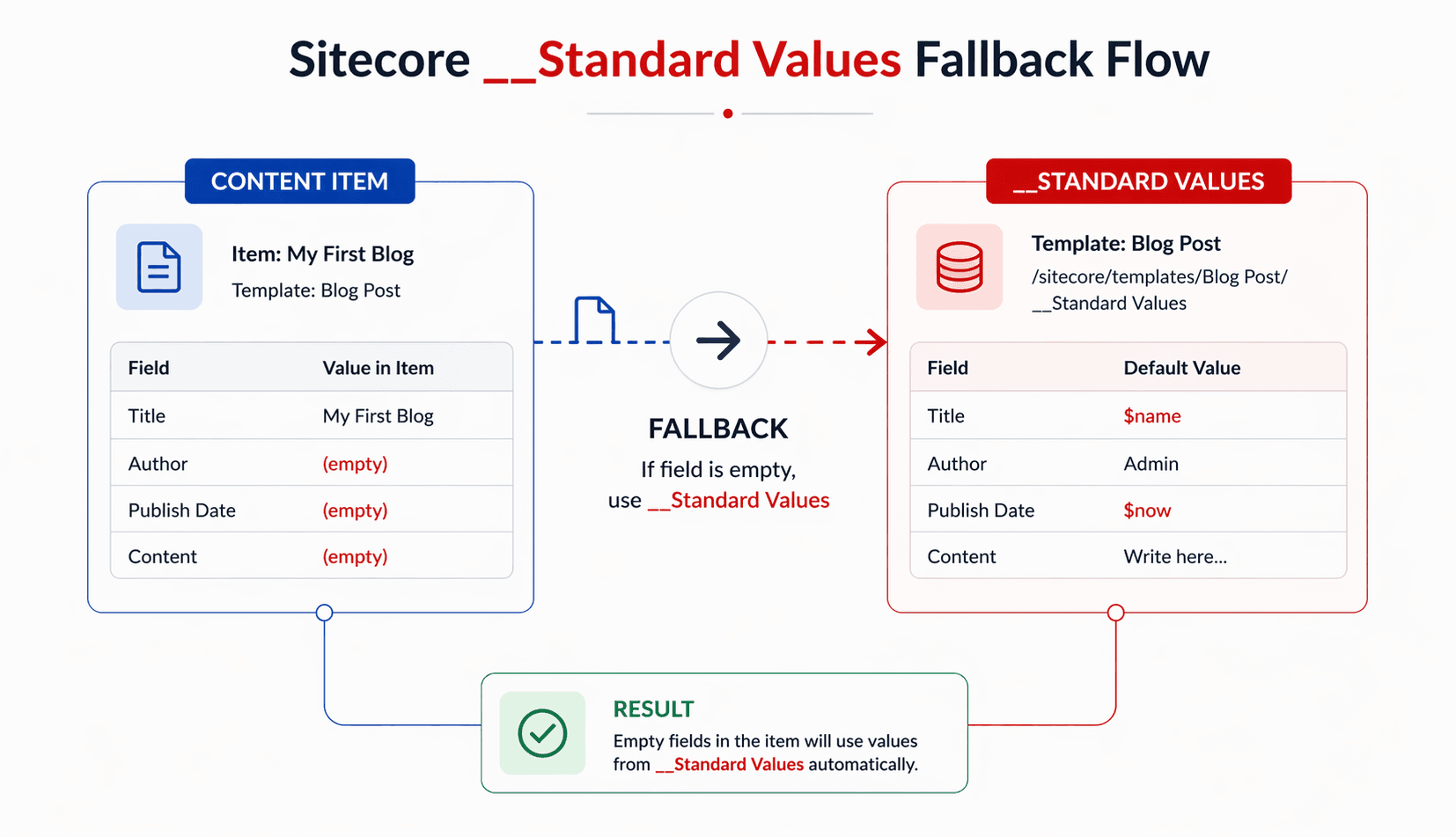
2. Enables Fallback Behavior
If a field is not filled in the actual item:
- Sitecore automatically falls back to __Standard Values
3. Stores Presentation Details
You can define:
- Layout
- Renderings
- Placeholder settings
in __Standard Values so all items inherit them.
4. Supports Token Replacement
You can use tokens like:
- $name
- $id
- $parentname
These get dynamically replaced when an item is created.
Where is it located?
Build Scalable, Consistent Sitecore Experiences Without Manual Effort
Inside the template:
/sitecore/templates/YourTemplate/__Standard Values
Example (Real-world Scenario)
Template: Blog Post
Fields:
- Title
- Author
- Publish Date
- Content
__Standard Values setup
| Field | Value |
|---|---|
| Title | $name |
| Author | Admin |
| Field | Value |
|---|---|
| Publish Date | $now |
| Content | Write here... |
What happens when you create a new item?
You create:
Item Name: My First Blog
Result:
| Field | Value | Why |
|---|---|---|
| Title | My First Blog | $name replaced |
| Author | Admin | default value |
| Publish Date | current date/time | $now replaced |
| Content | Write here... | default |
Fallback Example
Suppose you later:
- Clear the Author field in the item
Sitecore will still show:
Author = Admin
Because:
- It falls back to __Standard Values
Presentation Details Example
You can also define layout in __Standard Values:
Example:
- Assign a rendering: Blog Detail Component
- Set placeholder: main
Now:
- Every Blog Post automatically gets that layout
- No need to configure individually
Why is it important?
Without __Standard Values, you would need to:
- Manually fill fields every time
- Configure layout for every item
- Handle missing values in code
With it, you get:
- Consistency
- Faster content creation
- Cleaner code (less null checks)
Developer Perspective
In code (C#):
item["Author"]
If Author is empty in the item:
- Sitecore automatically returns value from __Standard Values
No extra logic needed.
Common Use Cases
- Default metadata (SEO fields)
- Default images/icons
- Base layouts
- Placeholder settings
- Workflow defaults
Important Notes
- __Standard Values is not an item users edit directly
- It affects all items of that template
- Changes apply globally (be careful!)
Quick Analogy
Think of it like:
A class constructor with default values in programming
or
A CSS base style applied to all elements unless overridden
Happy Coding!
Frequently Asked Questions
What are Standard Values in Sitecore?
Standard Values in Sitecore are default field values and settings defined for a data template. They are stored in a special __Standard Values item and provide reusable defaults for items based on that template.
Where are Sitecore Standard Values located?
Sitecore Standard Values are stored as a special child item under the data template, typically at a path such as /sitecore/templates/YourTemplate/__Standard Values.
How do Standard Values work in Sitecore?
When an item based on a template does not have a value for a field, Sitecore can use the corresponding standard value defined by the template. Standard Values also provide reusable default settings for template-based items.
What is the difference between a blank field and a NULL field in Sitecore?
A blank field and a NULL field are not always the same. By default, a field cleared by a content author can remain blank instead of falling back to Standard Values. The Reset Blank option can reset blank content to NULL so the standard value is used.
What tokens can be used in Sitecore Standard Values?
Sitecore supports tokens including $name, $date, $time, $now, $id, $parentid, and $parentname. These tokens can be expanded during item creation to generate dynamic default values.
What does the $name token do in Sitecore?
The $name token is replaced with the item's name when the item is created. If the item is renamed later, the original generated field value is not automatically updated.
Can Sitecore Standard Values define presentation details?
Yes. Standard Values can centrally define default presentation settings such as layouts and renderings, allowing template-based items to inherit consistent presentation configuration.
Can Standard Values define workflows and insert options?
Yes. Sitecore recommends using Standard Values to centrally manage settings such as initial workflow and insert options, helping reduce repetitive configuration across individual items.
How do Standard Values work with template inheritance?
Standard Values can be inherited through base templates. If multiple templates define a standard value for the same field, the value from the first applicable template in the inheritance list is used.
Why are Sitecore Standard Values important?
Standard Values improve content consistency, reduce manual configuration, support reusable templates, centralize default settings, simplify content creation, and help developers avoid repeated fallback logic.