How to Build a Full Stack App with Next.js 13 and Firebase
In This Article
.#.How to Set Up a Next.js 13 Project
1.In your desired directory, launch your terminal and run the following
npx create-next-app@latest --experimental-app.
2. Enter your project name and click enter and wait for it to install.
3. A new directory with your project name will be created with the necessary files.
4. cd your way into the new directory :
cd my-project-name
5. To start the development server, run the following command
npm run dev
How to Set Up Firebase in Next.js
- Go to https://console.firebase.google.com/ and login in with your Google account.
- Click on Add Project and give your project a name. Click on Continue.
- On the next screen you can choose if you want to enable analytics for your project.
- Click on Create project.
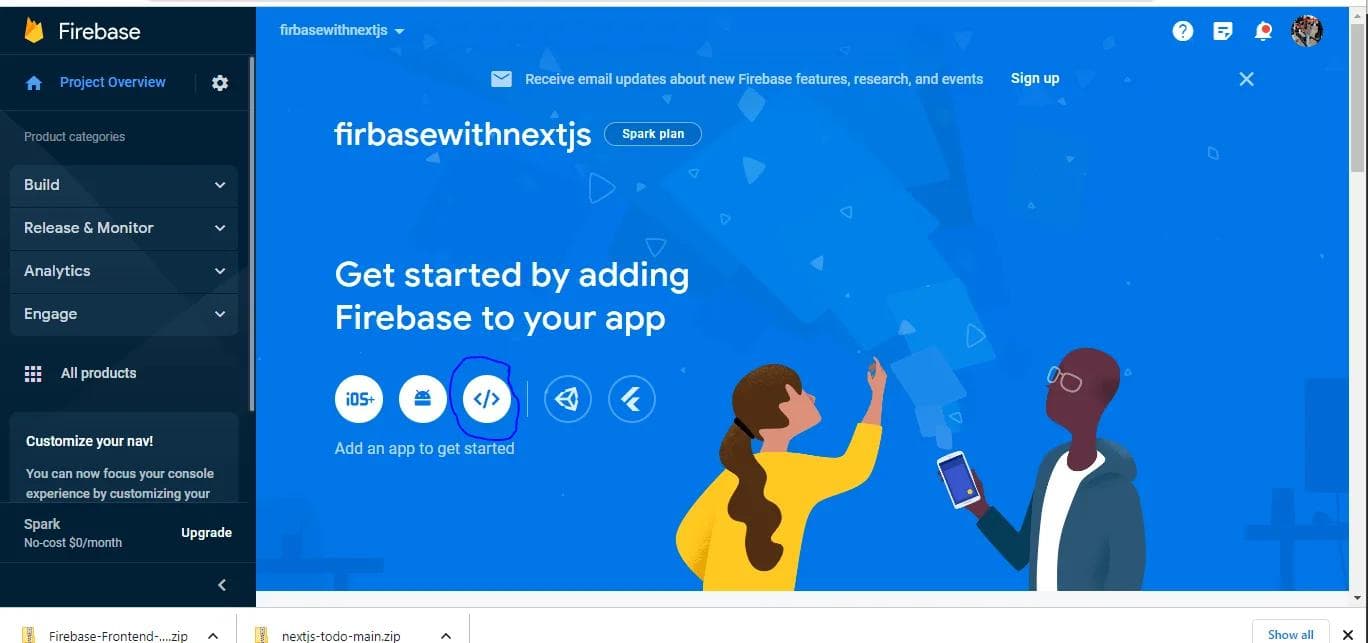
Next, you need to create a web app. On your project homepage click on the web icon to create your web app#image_title
Click here
Give your web app a name and click Register app.#image_title
- Copy the configuration file we are going to need it later. Click next until you are done.
Build Faster. Scale Smarter. Ship Modern Apps.
On your project homepage again, choose a product to add to your app. For the sake of this tutorial, add only Authentication and Cloud Firestore.#image_title
- For the Authentication choose Sign-in method add Email/password.
To use Firebase with Next.js, follow these steps
Install the latest firebase in your Next.js project by running the following command on your terminal
npm install firebase
Create a .env file in the root directory of your Next.js project and add your Firebase configuration files (the ones you copied earlier). It should look like thisNext, to make things more tidy, in in the root directory create a folder named firebase and create a file config.js with the following code
How to Set Up Authentication
- firebase directory, create a new directory called auth. We'll add all our firebase authentication related code in this directory.
Now create a signup.js file in the firebase > auth directory with the#image_title
createUserWithEmailAndPassword() method to sign up new users. Now we can use this signUp() function anywhere in our app.
3. In the same directory, let's add our signIn() function. Create a signin.js file with the following code:#image_title
How to Create the Signin and Signup pages in Next.js
- In Next.js 13 you create new pages in the app directory. Each page is a folder with a page.js file – you can learn more about creating pages from the Next.js docs.
To create the sign up page, create a new signup > page.js file in your app directory and add the following code:`
By default, each page you add in the app directory is a Server component which means we cannot add client-side interactivity like adding an onSubmit() to a form element. To add this client-side interactivity we tell Next.js that we want a Client component by adding the following at the top of the file before any imports:
In the same manner, we can create our login page. To create the sign in page, create a new signin > page.js file in your app directory and add the following code:How to Listen for Authentication Changes
Throughout our application we want to be able to tell if a certain user is logged in or not. We can create protected pages and only display some certain contents to the logged in user. Firebase provides us with an onAuthStateChanged() method that we can listen to for changes.
To make the user data from the above method available throughout our app, we are going to use React Context API. Create a folder named context in your src directory. Inside the context directory create a file called AuthContext.js and add the following code:Above we are simply creating a Provider that returns the user object if the user is logged in. If the user is not logged in, we simply return null.
To be able to use the value passed to the <AuthContext.Provider> we are exporting useAuthContext from the file. With that we can use the user value.
Before we can use this context we need to wrap all our components with AuthContextProvider. Open the src > app > layout.js file and edit the code with the following:How to Create Protected Pages
Create the directory admin > page.js in your app directory and add the following codeIf the user is null we are simply redirecting the user to the homepage. If the user is not null, we show them the protected page.
How to Communicate with Our Database
Create a file called addData.js inside the firestore directory and add the following code:#
We can now use this addData() function from any component to add data to our database:
#image_title
How to Get a Document from Firestore
Create a getData.js file in the Firestore directory and add the following code:#image_title
Frequently Asked Questions
What is How to Build a Full Stack App with Next.js 13 and Firebase?
1.In your desired directory, launch your terminal and run the following