Create Sitecore Renderings, Layouts and their Types
In This Article
- 1. What is Rendering in Sitecore?
- Types of Renderings
- 1. View Rendering
- 2. Controller Rendering
- 3. Partial Rendering (Legacy)
- 4. JSON Rendering (Headless)
- 2. What is a Layout?
- Layout Responsibilities
- Types of Layouts
- 1. MVC Layout
- 2. Web Forms Layout (Legacy)
- 3. Headless Layout (Layout Service)
- 3. What are Placeholders?
- Dynamic Placeholders
- 4. How Everything Works Together
- 5. Rendering Parameters
- Quick Analogy
- 6. Modern Sitecore Approach
When you work with Sitecore, understanding renderings, layouts, and their types is key to how pages are built and displayed. Think of it like assembling a webpage from reusable building blocks controlled by a CMS.
1. What is Rendering in Sitecore?
A rendering is a reusable component that outputs content on a page.
Examples:
- Header
- Navigation menu
- Hero banner
- Article list
- Footer
In Sitecore Experience Platform, renderings are the core building blocks of a page.

Build Smarter Sitecore Experiences
Transform complex Sitecore architectures into scalable, reusable, high-performance digital experiences with expert rendering and headless development.
Types of Renderings
1. View Rendering
- Uses Razor (.cshtml) views
- No controller required
- Best for simple UI logic
Example: Static banner or simple text block
2. Controller Rendering
Simplify Your Sitecore Architecture & Build Faster, Scalable Pages
- Uses an MVC controller + action method
- Supports complex logic and data processing
Example: Product listing with filtering logic
3. Partial Rendering (Legacy)
- Based on Web Forms (.ascx)
- Older approach (less used in modern projects)
4. JSON Rendering (Headless)
- Returns structured JSON instead of HTML
- Used in headless setups (React, Next.js, etc.)
Works with Sitecore JSS
2. What is a Layout?
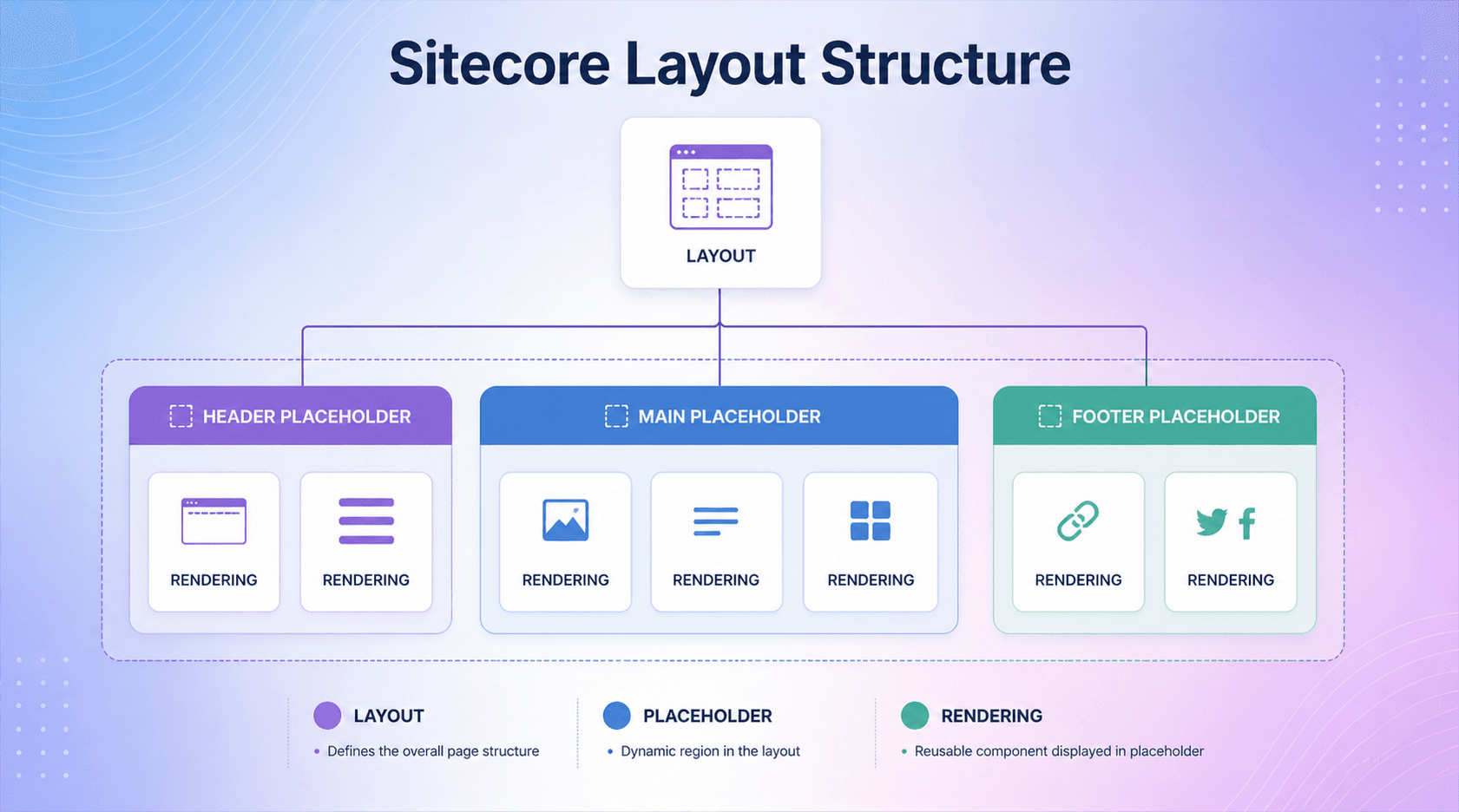
A layout defines the overall structure of a page.
Think of it like:
The skeleton where renderings are placed
Layout Responsibilities
- Defines placeholders (regions)
- Determines page structure (header, body, footer)
- Hosts renderings
Types of Layouts
1. MVC Layout
- Uses .cshtml
- Defines placeholders like:
- header
- main
- footer
2. Web Forms Layout (Legacy)
- Uses .aspx
- Older approach
3. Headless Layout (Layout Service)
- Layout returned as JSON
- Frontend (React/Next.js) renders UI
3. What are Placeholders?
A placeholder is a dynamic region in a layout where renderings are inserted.
Example:
- main-content
- sidebar
- footer-links
Dynamic Placeholders
- Allow multiple instances
- Useful for reusable components (like multiple cards)
4. How Everything Works Together
Here’s the flow:
- Layout defines structure
- Placeholders define regions
- Renderings fill those regions
- Sitecore assembles everything into a page
In headless:
- Layout Service → JSON → Frontend renders UI
5. Rendering Parameters
Renderings can have parameters to control behavior.
Examples:
- CSS class
- Number of items to show
- Display style
Quick Analogy
- Layout = House blueprint
- Placeholders = Rooms
- Renderings = Furniture
- Rendering parameters = Furniture settings
6. Modern Sitecore Approach
Today, most projects use:
- MVC Renderings OR
- Headless (JSS + Layout Service)
Frequently Asked Questions
What are renderings in Sitecore?
Sitecore renderings are presentation components that define how content is displayed on a page. They can be added to placeholders within a layout and can use datasource items and rendering parameters to control their content and behavior.
What is the difference between a Sitecore layout and a rendering?
A Sitecore layout defines the overall page structure and typically contains the main placeholders where components can be placed. A rendering represents an individual component or content presentation that is inserted into those placeholders.
What are the main types of Sitecore renderings?
Common Sitecore rendering types include View Renderings and Controller Renderings in Sitecore MVC solutions. In headless implementations, JSON Renderings are used to provide structured component data to frontend applications such as React or Next.js.
What is a Sitecore View Rendering?
A Sitecore View Rendering is an MVC presentation component that typically uses a Razor .cshtml view to render content. It is commonly used for components that do not require complex controller-based business logic.
What is a Sitecore Controller Rendering?
A Sitecore Controller Rendering connects a rendering definition to a controller action. It is useful when a component requires custom business logic, data processing or a dedicated controller before producing its output.
What is a JSON Rendering in Sitecore?
A JSON Rendering is designed for headless Sitecore implementations. It serializes rendering data through the Layout Service so frontend applications can consume structured content and render components independently of the Sitecore server-side presentation layer.
What are placeholders in Sitecore?
Placeholders are defined areas within Sitecore layouts or components where renderings can be inserted. Placeholder settings can control which components are allowed in each location, helping content authors build pages within predefined design rules.
What are Sitecore rendering parameters?
Rendering parameters allow developers to configure how a rendering behaves without hard-coding every variation into the component. They can control presentation options and other configurable properties for individual rendering instances.
How do Sitecore renderings work with headless development?
In headless Sitecore development, rendering definitions and placeholders describe the page structure while the Layout Service provides structured JSON data to the frontend. Frameworks such as React and Next.js can then use that data to render the components.
Why are reusable Sitecore renderings important for enterprise websites?
Reusable Sitecore renderings help development teams create consistent components that can be configured and reused across multiple pages. This can improve maintainability, accelerate content production and support scalable enterprise digital experiences.