Beyond the Basics: A Developer’s Guide to Architecting Sanity v5
In This Article
When you transition from a traditional CMS to a composable, decoupled architecture, the initial freedom can feel overwhelming. Sanity gives you a blank canvas, but without a strict engineering philosophy, that canvas can quickly turn into a chaotic, unmaintainable mess of schemas and circular references. With the release of Sanity v5 (specifically targeting the performance and API enhancements in ^5.20.0), the platform has solidified its position as a developer-first content operating system.
But out-of-the-box setups rarely cut it for enterprise applications. A common question we get from engineering teams scaling their digital platforms is exactly how we configure sanity to handle complex relational data, strict type safety, and real-time visual editing without degrading the developer experience (DX).
In this deep dive, we are opening up our internal playbooks. We will walk through our production-grade configuration strategy, focusing on multi-workspace setups, strict schema typing, and custom structure builders that keep the editorial experience flawless.
The Core sanity.config.ts Architecture
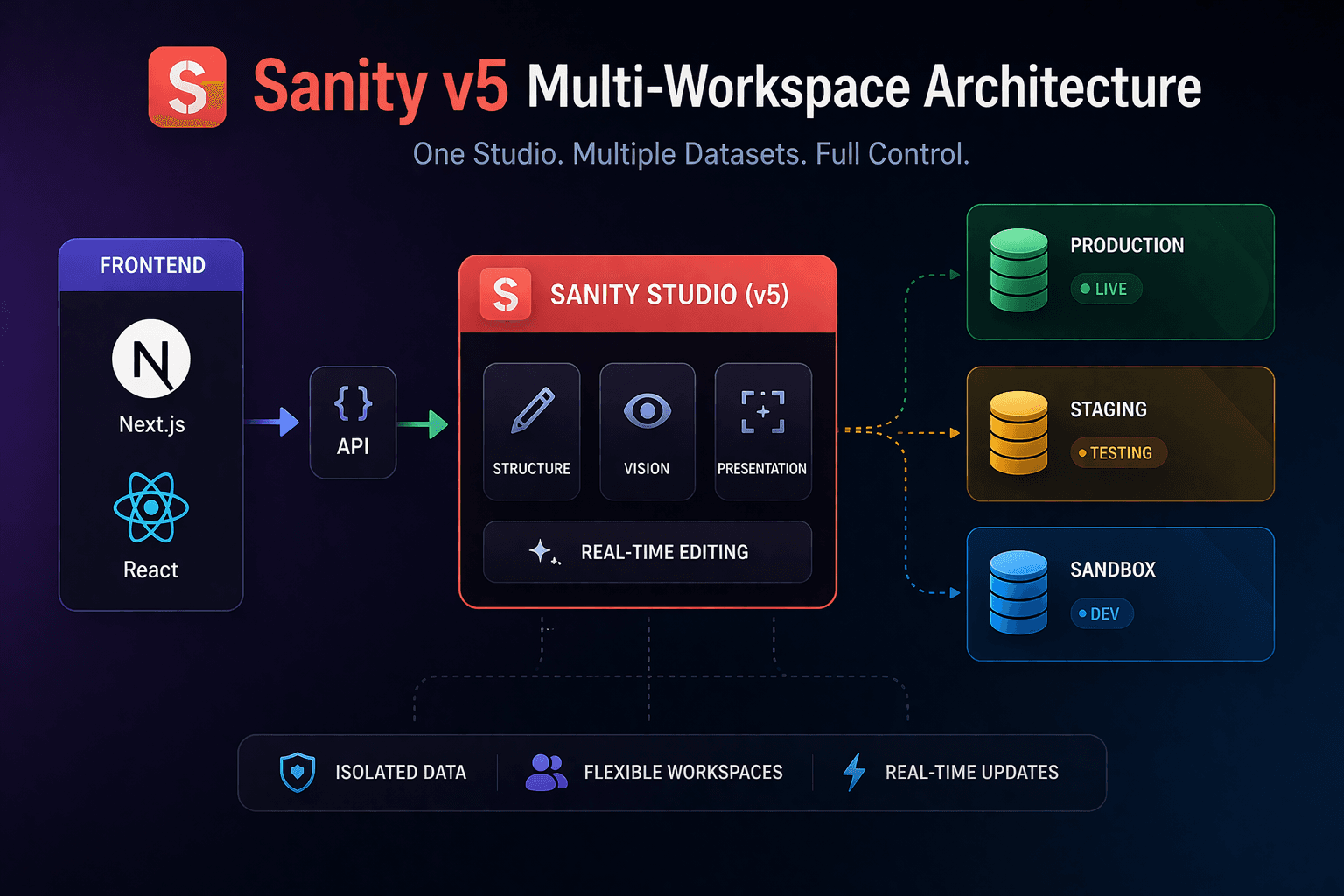
In Sanity v5, the sanity.config.ts file is the absolute command center of your Studio. While a basic setup exports a single defineConfig object, our enterprise projects almost always require a multi-workspace configuration. This allows us to serve different datasets (e.g., production, staging, sandbox) or completely different editorial interfaces from a single deployed Studio instance.
Here is a simplified version of our standard multi-workspace setup:
// sanity.config.ts
import { defineConfig } from 'sanity'
import { structureTool } from 'sanity/structure'
import { visionTool } from '@sanity/vision'
import { presentationTool } from 'sanity/presentation'
import { schemaTypes } from './schemas'
import { customStructure } from './deskStructure'

const sharedConfig = {
  schema: {
    types: schemaTypes,
  },
  plugins: [
    structureTool({ structure: customStructure }),
    visionTool(),
    presentationTool({
      previewUrl: process.env.SANITY_STUDIO_PREVIEW_URL || 'http://localhost:3000',
    }),
  ],
}

export default defineConfig([
  {
    name: 'production-workspace',
    title: 'Production Content',
    projectId: process.env.SANITY_STUDIO_PROJECT_ID!,
    dataset: 'production',
    basePath: '/production',
    ...sharedConfig,
  },
  {
    name: 'staging-workspace',
    title: 'Staging Environment',
    projectId: process.env.SANITY_STUDIO_PROJECT_ID!,
    dataset: 'staging',
    basePath: '/staging',
    ...sharedConfig,
  },
])
Notice the inclusion of the presentationTool. In v5, Visual Editing has become a first-class citizen. By configuring the Presentation API, we enable cross-origin communication between the Studio and our Next.js frontends, allowing editors to click a component on the live preview and instantly open the corresponding document in the Studio desk.
Enforcing Type Safety with defineType and defineField
Fix Content Chaos. Build Structured, Scalable CMS Architecture
Prior to the robust typing features solidified in recent versions, developers often relied on raw objects for schema definitions. In our current architecture, utilizing defineType, defineField, and defineArrayMember is non-negotiable. This not only provides excellent autocomplete in your IDE but also bridges the gap to frontend type generation using sanity typegen.
Here is how we structure a highly relational document:
// schemas/article.ts
import { defineType, defineField, defineArrayMember } from 'sanity'
import { DocumentTextIcon } from '@sanity/icons'

export const article = defineType({
  name: 'article',
  title: 'Article',
  type: 'document',
  icon: DocumentTextIcon,
  fields: [
    defineField({
      name: 'title',
      title: 'Title',
      type: 'string',
      validation: (rule) => rule.required().max(100),
    }),
    defineField({
      name: 'slug',
      title: 'Slug',
      type: 'slug',
      options: { source: 'title', maxLength: 96 },
      validation: (rule) => rule.required(),
    }),
    defineField({
      name: 'author',
      title: 'Author',
      type: 'reference',
      to: [{ type: 'author' }],
    }),
    defineField({
      name: 'content',
      title: 'Content Blocks',
      type: 'array',
      of: [
        defineArrayMember({ type: 'block' }),
        defineArrayMember({ type: 'imageBlock' }), // Custom modular component
        defineArrayMember({ type: 'codeBlock' })
      ],
    }),
  ],
  preview: {
    select: {
      title: 'title',
      author: 'author.name',
      media: 'author.image',
    },
    prepare(selection) {
      const { author } = selection
      return { ...selection, subtitle: author && `by ${author}` }
    },
  },
})
By strictly defining fields, we ensure that when we run our GROQ queries on the frontend, the data structure perfectly matches the TypeScript interfaces we expect, drastically reducing runtime errors. If you are struggling with aligning your CMS data with your frontend types, you can explore our Custom CMS Development Services to see how we bridge this gap.
Taming the Desk: The Structure Builder
By default, Sanity throws every document type into a single, flat list. For a developer building a proof-of-concept, this is fine. For an editorial team managing thousands of localized assets, it is a nightmare.
A massive part of how we configure sanity relies on heavily customizing the @sanity/structure plugin. We organize content by domain, separate singletons (like "Global Site Settings") from collections (like "Blog Posts"), and inject custom React views directly into the desk.
// deskStructure.ts
import { StructureResolver } from 'sanity/structure'
import { CogIcon } from '@sanity/icons'

export const customStructure: StructureResolver = (S) =>
  S.list()
    .title('Content Universe')
    .items([
      // Singleton pattern for Site Settings
      S.listItem()
        .title('Site Settings')
        .icon(CogIcon)
        .child(
          S.document()
            .schemaType('siteSettings')
            .documentId('siteSettings')
        ),
      S.divider(),
      // Standard collections filtered out from the main list
      ...S.documentTypeListItems().filter(
        (listItem) => !['siteSettings'].includes(listItem.getId() as string)
      ),
    ])
Advanced Data Migrations
As your application evolves, your schema will change. Fields get renamed, data types shift, and new relational structures are introduced. Handling this in a production environment without downtime requires strict DevOps practices. We leverage Sanity's CLI and the @sanity/client to write deterministic mutation scripts.
Instead of manually updating documents, we write scripts that query all documents matching a legacy schema, transform the data locally, and push batched transaction mutations back to the dataset. This ensures data integrity and allows us to test migrations in our staging workspace before touching production. For deeper insights into our CI/CD pipelines and infrastructure management, check out our DevOps & Architecture Solutions.
Ready to Build Better Content APIs?
Configuring Sanity v5 is about treating your content architecture with the same rigor you apply to your backend microservices. If your current CMS implementation is slowing down your frontend builds or causing friction for your editorial team, we can help.
Contact our engineering team today to audit your current Sanity configuration and learn how we can optimize your content graph for maximum performance and scalability.
Frequently Asked Questions
What is Beyond the Basics: A Developer’s Guide to Architecting Sanity v5?
Learn advanced Sanity v5 architecture with multi-workspace setup, schema design, type safety, and performance optimization for scalable CMS projects.