Architecture Comparison: Making the Right CMS Decision
In This Article
- 1. Traditional CMS vs Headless CMS
- Traditional CMS (Monolithic)
- 2. Decoupled Architecture (The Middle Ground)
- 3. Sitecore JSS vs XM Cloud
- 4. Helix Principles: Structuring for Scale
- What is Helix?
- Why Helix Matters for Decision-Makers
- 5. Strategic Takeaways
- Choose Traditional CMS if:
- Choose Headless / XM Cloud if:
- Choose Decoupled / JSS if:
- Final Thought
Sitecore JSS vs XM Cloud • Traditional vs Headless • Decoupled Architecture • Helix Principles
Modern digital experiences demand speed, flexibility, and scalability. Choosing the right CMS architecture is no longer just a technical decision—it directly impacts business agility, customer experience, and long-term cost.
This guide breaks down the key architectural choices leaders must evaluate.
1. Traditional CMS vs Headless CMS
Traditional CMS (Monolithic)
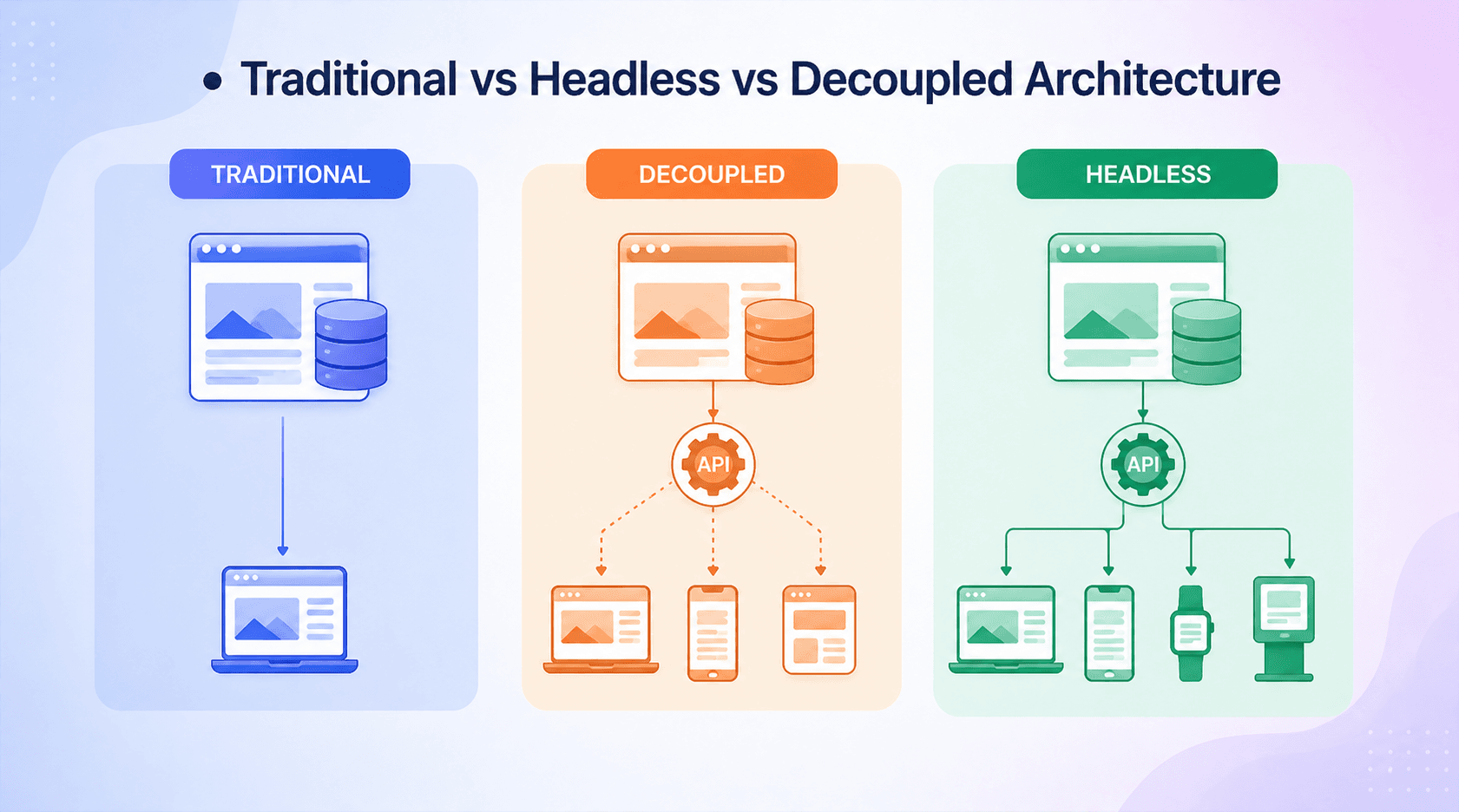
A traditional CMS tightly couples content management, presentation, and delivery into a single system.
Key Characteristics:
- Backend + frontend tightly integrated
- Page rendering happens within the CMS
- Limited flexibility for omnichannel delivery
Pros:
- Faster initial setup
- Easier for small teams
- Built-in preview and editing
Cons:
- Hard to scale across channels (mobile, IoT, apps)
- Slower performance under heavy load
- Developer constraints due to rigid architecture
Headless CMS
A headless CMS separates content from presentation and delivers it via APIs.
Key Characteristics:
- Content delivered via REST/GraphQL APIs
- Frontend built using modern frameworks (React, Next.js, etc.)
- Channel-agnostic content reuse
Pros:
- Omnichannel delivery (web, mobile, kiosks, etc.)
- Faster performance with CDN and edge delivery
- Greater developer flexibility
Cons:
- Requires frontend expertise
- More initial architectural planning
- Preview/editing can be more complex
2. Decoupled Architecture (The Middle Ground)
Future-Proof Your Digital Experience with the Right Architecture
Decoupled architecture blends traditional and headless approaches.
What it means:
- CMS still controls some presentation
- Frontend may consume APIs but is not fully independent
Why it matters:
- Easier transition from monolithic systems
- Retains some marketer-friendly features
- Reduces risk during modernization
Trade-offs:
- Not as flexible as fully headless
- Can introduce architectural complexity
3. Sitecore JSS vs XM Cloud
Sitecore JSS
Sitecore JSS enables developers to build modern frontends (React, Angular, Vue) while integrating with Sitecore’s backend.
Architecture Highlights:
- Headless-first development model
- Supports disconnected (offline) development
- Integrates with existing Sitecore XP/XM setups
Best For:
- Organizations modernizing existing Sitecore implementations
- Teams transitioning gradually to headless
Sitecore XM Cloud
XM Cloud is Sitecore’s fully cloud-native, SaaS-based headless CMS.
Architecture Highlights:
- Fully headless and API-driven
- Built on modern SaaS infrastructure
- Native integration with edge delivery and composable tools
Best For:
- Greenfield projects
- Enterprises seeking cloud-native scalability
- Teams adopting composable DXP strategies
Key Comparison
| Feature | Sitecore JSS | XM Cloud |
|---|---|---|
| Architecture | Headless add-on | Fully headless SaaS |
| Deployment | Self-hosted / PaaS | SaaS (cloud-native) |
| Flexibility | High | Very high |
| Maintenance | Requires management | Managed by Sitecore |
| Time to Marke | Moderate | Faster |
Decision Insight:
- Choose JSS if you are evolving an existing Sitecore ecosystem
- Choose XM Cloud if you want a future-proof, cloud-first platform
4. Helix Principles: Structuring for Scale
What is Helix?
Helix is Sitecore’s recommended architecture guideline for building scalable, maintainable solutions.
Core Principles:
- Separation of Concerns
- Divide code into independent modules
- Layered Architecture
- Foundation → Feature → Project
- Dependency Control
- Prevent tight coupling between components
Why Helix Matters for Decision-Makers
- Reduces technical debt
- Enables parallel team development
- Improves long-term maintainability
- Supports scalable enterprise solutions
5. Strategic Takeaways
For leadership teams, the decision is less about tools and more about future readiness:
Choose Traditional CMS if:
- You need quick deployment
- Digital maturity is low
- Omnichannel is not a priority
Choose Headless / XM Cloud if:
- You prioritize scalability and performance
- Omnichannel delivery is critical
- You want cloud-native agility
Choose Decoupled / JSS if:
- You’re in transition
- You want to modernize without full replatforming
Final Thought
The shift toward headless and composable architectures is not a trend—it’s a response to evolving customer expectations.
Organizations that invest in flexible, API-driven systems today will be better positioned to adapt tomorrow.
Frequently Asked Questions
What is Architecture Comparison: Making the Right CMS Decision?
Compare Sitecore JSS vs XM Cloud and traditional vs headless CMS. Learn decoupled architecture, Helix principles, and how to choose the right CMS for scalability and performance.