Understanding Core Concepts in Sitecore: Data Sources, Items, Versions & Caching
In This Article
- What is a Data Source in Sitecore?
- Example
- Types of Data Sources
- Why it matters
- Understanding Page Items
- A Page Item includes:
- Item Types in Sitecore
- Common Item Types
- Why this matters
- Language Version vs Item Version
- Language Version
- Item Version
- Key Insight
- Caching in Sitecore (Performance Backbone)
- Types of Caching
- Cache Variations
- Example Pitfall
- Final Thoughts
When working with Sitecore, understanding its core content architecture is essential. Whether you're a developer, architect, or content author, these foundational concepts shape how content is structured, rendered, and optimized.
In this blog, we’ll break down five key concepts:
- Data Sources
- Page Items
- Item Types
- Language & Versioning
- Caching
Let’s dive in.
What is a Data Source in Sitecore?
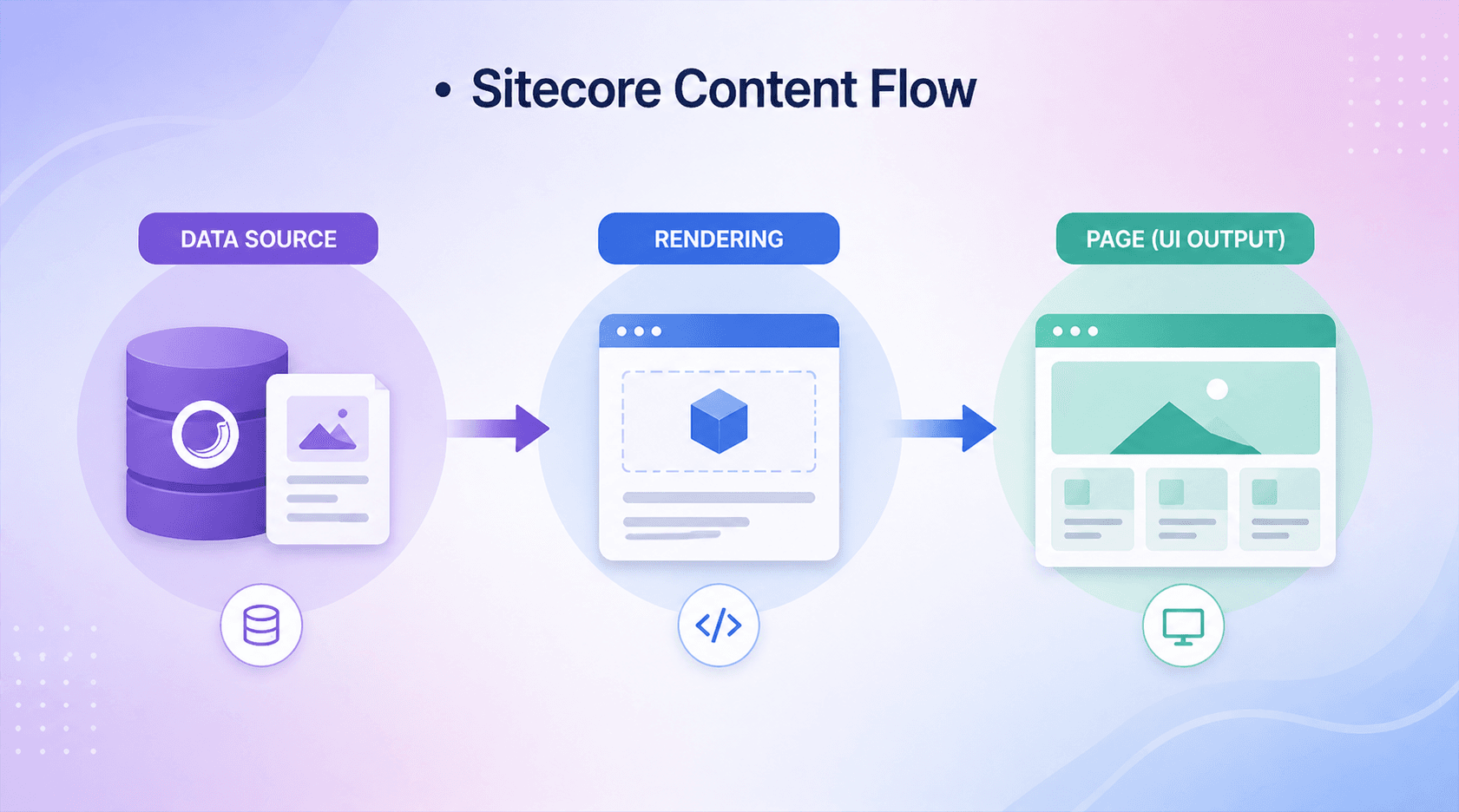
A Data Source is the content item that a rendering (component) uses to display content.
Instead of embedding content directly inside a component, Sitecore promotes a separation of content and presentation. This allows developers to build reusable components and content authors to manage content independently.
Example
Imagine a Hero Bannercomponent :
- On the homepage → it pulls content from one item
- On another page → it uses a completely different item
Same component, different data → highly reusable.
Master Sitecore Data For Performance
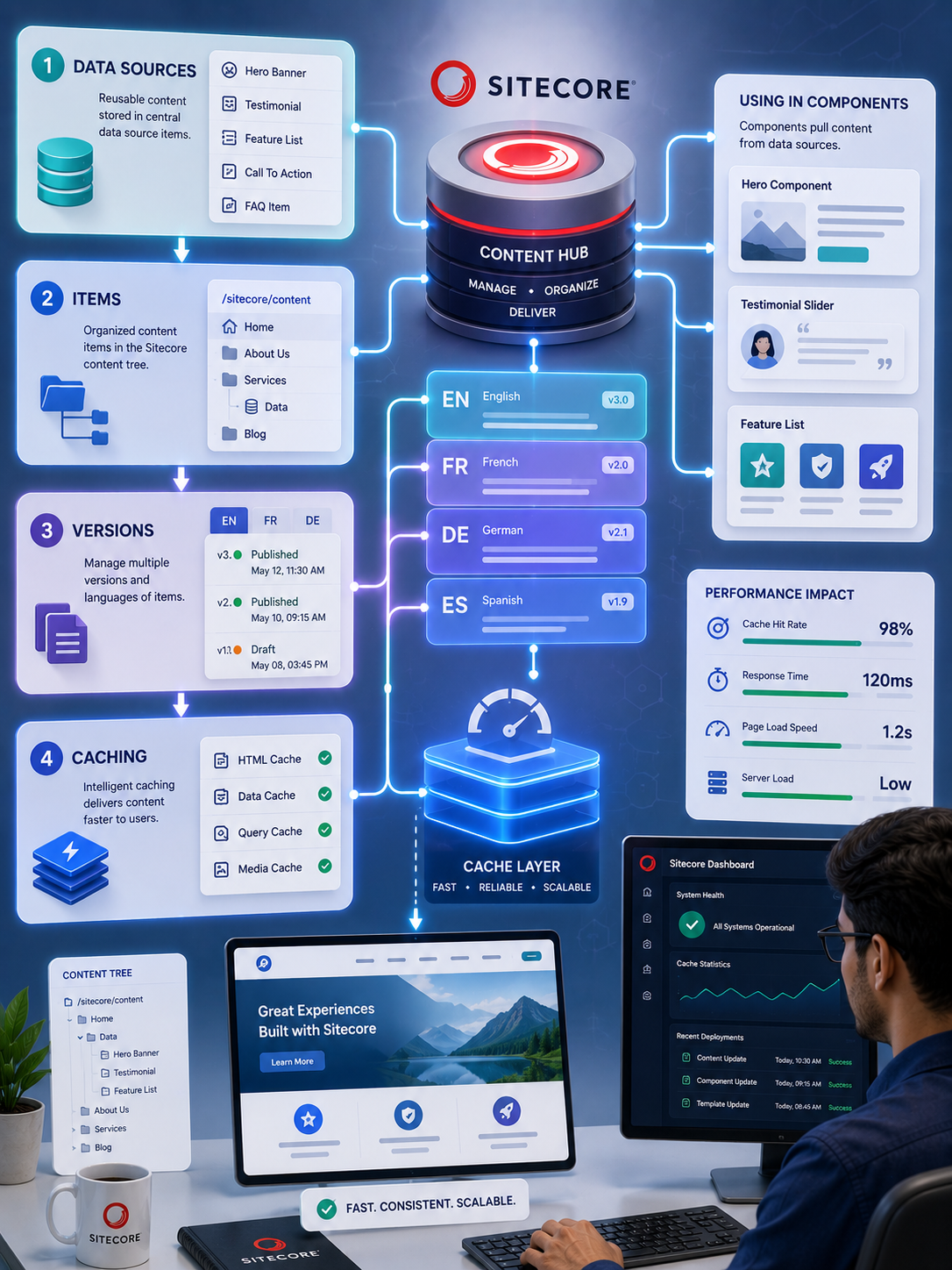
Understand data sources, items, versions, and caching to build faster, scalable Sitecore solutions with cleaner content architecture and optimized performance.
Types of Data Sources
- Local Data Source → Stored under the page
- Global Data Source → Shared across pages
- Query-based Data Source → Uses Sitecore queries (less common today)
Why it matters
- Improves reusability
- Keeps content structured
- Simplifies maintenance
Understanding Page Items
A Page Item represents a webpage in Sitecore.
It lives inside the content tree (typically under /sitecore/content/...) and is built using a template.
A Page Item includes:
- Content fields (Title, Body, Images)
- Presentation details (layouts and renderings)
- Language and version information
Think of it as the central unit of a webpage, combining both content and structure.
Item Types in Sitecore
Sitecore is entirely item-based, but not all items serve the same purpose.
Build a Scalable, Future-Ready Sitecore Experience
Common Item Types
1. Templates
Define the structure of content (like a schema)
2. Content Items
Actual data created using templates (pages, components)
3. Rendering Items
Define how components behave and render (MVC, View renderings)
4. Media Items
Store assets like images, PDFs, and videos
Why this matters
Understanding item types helps you:
- Design scalable architectures
- Separate concerns properly
- Build maintainable solutions
Language Version vs Item Version
This is one of the most important concepts in Sitecore—and often misunderstood.
Language Version
Represents content in different languages.
Example:
- English → “About Us”
- French → “À propos”
Each language has its own version of content.
Item Version
Represents different versions of content within the same language.
Example (English):
- Version 1 → Original content
- Version 2 → Updated content
Key Insight
The structure looks like this:
Item → Language → Version
This allows Sitecore to support both:
- Multilingual content
- Content history and updates
Need Expert Help With Sitecore Core Concepts?
Our Sitecore development services help teams implement reusable data sources, item structures, versioning, caching, and content architecture correctly for scalable, maintainable Sitecore solutions.
Caching in Sitecore (Performance Backbone)
Caching is critical for performance in Sitecore, especially for large-scale or high-traffic websites.
Types of Caching
1. HTML Cache
Stores rendered output of components (biggest performance gain)
2. Data Cache
Stores raw data from the database
3. Item Cache
Caches Sitecore items
4. Media Cache
Caches images and media files
5. Prefetch Cache
Loads frequently used items at startup
6. Path Cache
Optimizes item path resolution
Cache Variations
Sitecore allows you to vary cache based on:
- User (logged in vs anonymous)
- Data source
- Query string
- Device
Example Pitfall
If you don’t vary cache by data source, the wrong content may appear on different pages.
Final Thoughts
Sitecore’s power lies in its flexible and structured content architecture.
By understanding:
- How data sources feed components
- How page items represent content
- How item types define structure
- How versioning supports multilingual and evolving content
- And how caching boosts performance
you can build scalable, maintainable, and high-performing Sitecore solutions.
Happy Coding!
Frequently Asked Questions
What is a data source in Sitecore?
A Sitecore data source is a content item that a rendering or component uses to retrieve and display content. Data sources separate content from presentation and make components more reusable.
What is the difference between a Sitecore data source and a page item?
A page item represents a webpage in the Sitecore content tree, while a data source is a content item that a component can reference to retrieve specific content independently of the page.
What are items in Sitecore?
Items are the fundamental units of content and configuration in Sitecore. They can represent pages, content, templates, renderings, media, settings, and other objects within the Sitecore content tree.
What is the difference between a Sitecore language version and item version?
A language version represents content in a specific language, while an item version represents a different revision of that content within the same language.
How does versioning work in Sitecore?
Sitecore can maintain multiple versions of an item within each language. This allows teams to manage content revisions, updates, approvals, and multilingual content independently.
What are the main types of caching in Sitecore?
Common Sitecore caching mechanisms include HTML cache, data cache, item cache, media cache, prefetch cache, and path cache. Each supports different aspects of content retrieval and application performance.
How does Sitecore caching improve website performance?
Sitecore caching reduces repeated database or processing work by keeping frequently accessed content or rendered output in memory, allowing requests to retrieve data faster.
Why is cache variation important in Sitecore?
Cache variation ensures that cached output is appropriate for different contexts such as users, data sources, query strings, or devices. Incorrect variation can cause one context to receive content cached for another.
What is a reusable data source in Sitecore?
A reusable data source is a content item that can be selected by a rendering and reused across multiple pages or components. This separates shared content from individual page structures.
Why are Sitecore data sources important for scalable component development?
Data sources separate content from presentation, allowing the same component to display different content in different contexts. This improves reuse, content management, consistency, and maintainability.