Sitecore Headless Architecture Guide 2026: Next.js, Content SDK & SitecoreAI
In This Article
- What Is Sitecore Headless Architecture?
- The Core Components
- 1. Sitecore Content Platform
- 2. Experience Edge
- Content SDK and JSS
- Why Next.js Fits Sitecore Headless
- Editing Still Matters in Headless
- Caching and Performance
- Sitecore XP/XM Headless vs SitecoreAI
- Existing XP/XM Headless
- SitecoreAI / XM Cloud
- When Should You Choose Sitecore Headless?
Modern digital platforms need to deliver content across websites, mobile experiences, applications, portals, campaign pages, and increasingly AI-powered interfaces.
Traditional CMS architectures can make this difficult because content management and frontend rendering are often closely coupled.
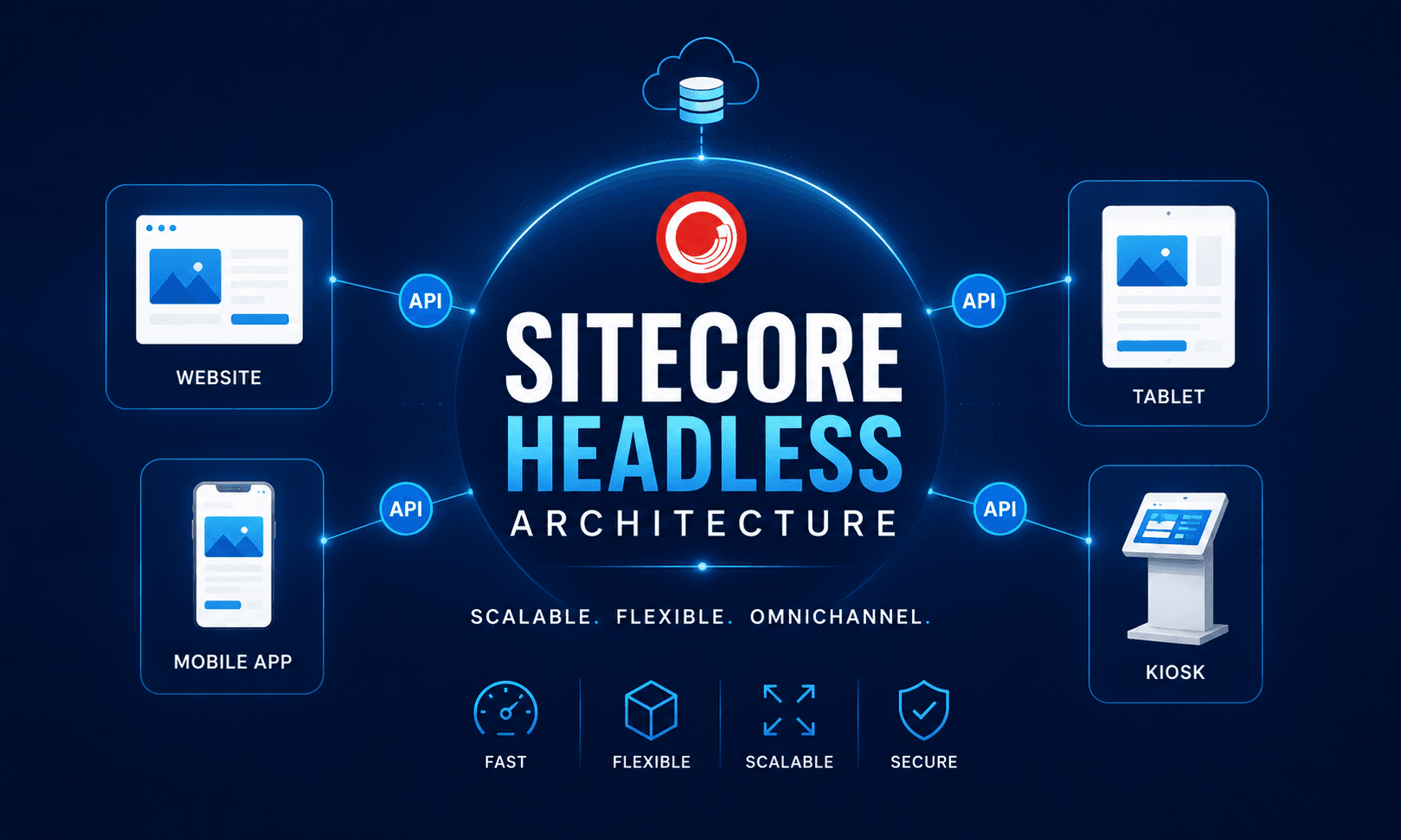
Sitecore Headless Architecture separates these responsibilities.
Sitecore manages structured content, page composition, authoring, publishing, and enterprise content operations, while a frontend application commonly built with Next.js controls the customer-facing experience.
The result is an architecture designed for faster frontend development, independent deployments, reusable content, and multi-channel delivery.

Build Modern Sitecore Headless Experiences
Implement scalable headless architecture with Next.js, Content SDK, Experience Edge, GraphQL, reusable components, and SitecoreAI for high-performance digital experiences.
What Is Sitecore Headless Architecture?
In a traditional Sitecore implementation, the CMS may participate directly in generating the final HTML delivered to visitors.
With headless architecture, Sitecore instead provides content and presentation data through APIs, while a separate frontend application renders the experience.
A simplified architecture looks like:
Content Authors → Sitecore → Content Delivery API → Next.js → Customer
For current SitecoreAI implementations, Experience Edge provides a scalable delivery layer. Published layout and content can be retrieved through GraphQL, while media can be served through CDN delivery. Sitecore supports using this data for static generation, server-side rendering, incremental generation, and other frontend patterns.
This separation is what makes Sitecore headless.
Sitecore becomes the content and experience engine.
Next.js becomes the presentation and application layer.
Modernize Your Sitecore Architecture for Faster Digital Experiences
The Core Components
A modern Sitecore headless implementation typically includes several architectural layers.
1. Sitecore Content Platform
Editors create pages, reusable content, media, components, language versions, and campaign experiences inside Sitecore.
Content modeling remains one of the most important architectural decisions because a good model enables information to be reused beyond a single webpage.
Instead of designing only:
Homepage Template → Services Page → Product Page
think in reusable entities:
Hero → Product → Article → CTA → Testimonial → FAQ → Promo
Those entities can potentially serve websites, applications, campaign experiences, or other channels.
2. Experience Edge
For SitecoreAI previously known as XM Cloud Experience Edge acts as the headless publishing and content-delivery layer.
The frontend retrieves published layout, dictionary, and content information using GraphQL.
This changes the request model from:
Browser → CMS renders page
to:
Frontend → Edge/API → Structured Sitecore data → Frontend rendering
That architectural separation is one of the major advantages of headless Sitecore.
Content SDK and JSS
Older Sitecore headless implementations are commonly associated with Sitecore JavaScript Services (JSS).
JSS provides the integration required for JavaScript frameworks to understand Sitecore layouts, placeholders, fields, components, routes, and editing experiences.
For newer SitecoreAI implementations, however, Sitecore Content SDK is increasingly the more important technology to understand.
Sitecore describes Content SDK as the headless development suite for modern SitecoreAI applications. It provides APIs, rendering helpers, placeholder support, field handling, developer utilities, and Next.js starter applications.
Sitecore also provides upgrade guidance from existing JSS applications to Content SDK, describing Content SDK as a major architectural improvement that reduces unnecessary starter complexity.
So the practical learning path in 2026 is:
Understand JSS → Understand existing implementations → Learn Content SDK for modern SitecoreAI development.
Why Next.js Fits Sitecore Headless
Next.js is a natural fit for Sitecore because it gives frontend teams control over rendering and application behavior while Sitecore remains responsible for content.
A Next.js implementation can support:
- Server-side rendering
- Static generation
- Incremental generation
- Dynamic routing
- Component-based development
- API integrations
- Modern frontend optimization
The application receives Sitecore layout information and dynamically maps Sitecore renderings to frontend components.
Conceptually:
Sitecore Page → Layout Data → Placeholders → Components → Next.js UI
Sitecore’s current Content SDK continues this author-driven component model. Pages use layouts and named placeholders, while frontend applications render the component hierarchy defined by content authors.
Editing Still Matters in Headless
One common misunderstanding is that headless means marketers lose visual editing.
They do not have to.
SitecoreAI supports connecting frontend applications to its visual page-editing experience so authors can compose pages using frontend components while developers retain control over how those components are implemented.
This is crucial in enterprise projects.
A technically perfect architecture that requires developers for every page update is not truly successful.
The goal should be:
developer-controlled components + marketer-controlled composition.
Build Scalable Sitecore Headless Platforms with Next.js Expertise
Caching and Performance
Headless does not automatically make a website fast.
Performance still depends on architecture.
A strong implementation considers:
- Experience Edge delivery
- CDN strategy
- Frontend caching
- API caching
- Image optimization
- Rendering strategy
- Static versus dynamic content
- Revalidation
- Third-party API performance
Next.js allows teams to select rendering strategies based on individual use cases rather than forcing every page through one rendering model.
Sitecore XP/XM Headless vs SitecoreAI
The original article compares JSS versus XM Cloud as though they are alternatives. That comparison should be updated.
A more useful decision is:
Existing XP/XM Headless
Relevant when organizations already operate Sitecore XP/XM, require significant infrastructure control, or need to modernize an existing Sitecore estate incrementally.
SitecoreAI / XM Cloud
Better aligned with organizations pursuing SaaS content management, Experience Edge delivery, composable architecture, reduced CMS infrastructure responsibility, and modern frontend development.
Sitecore’s current documentation explicitly notes that XM Cloud is now SitecoreAI, although older configuration names and developer assets may continue to use XM Cloud terminology during the transition.
When Should You Choose Sitecore Headless?
Sitecore headless architecture is particularly valuable when an organization needs:
- Enterprise websites with modern frontend frameworks
- Global or multilingual experiences
- Independent frontend releases
- Reusable structured content
- Multi-site platforms
- Omnichannel delivery
- SaaS-based Sitecore modernization
- Integration with external APIs and digital products
Headless should not be chosen simply because it is modern.
It works best when the business genuinely benefits from separating content management from experience delivery.
Frequently Asked Questions
What is Sitecore Headless Architecture?
Sitecore Headless Architecture separates content management from frontend rendering. Sitecore manages structured content, layouts and authoring, while a frontend such as Next.js retrieves content through APIs and independently renders the digital experience.
How does Sitecore Headless Architecture work?
Content authors manage pages and components in Sitecore, published content is exposed through services such as Experience Edge, and a frontend application retrieves layout and content data through APIs such as GraphQL before rendering the experience.
What is SitecoreAI?
SitecoreAI is Sitecore's current cloud content and experience platform name for what was previously known as XM Cloud. Some developer tools and configuration names can still contain XM Cloud terminology during the transition.
What is Sitecore Content SDK?
Sitecore Content SDK is part of Sitecore's modern headless development suite for SitecoreAI. It provides APIs, rendering helpers, placeholder support, field components and developer tooling for applications such as Next.js.
What is Sitecore Experience Edge?
Sitecore Experience Edge is a managed GraphQL-based delivery service that exposes published Sitecore layout and content while serving media through CDN delivery for scalable headless applications.
Why is Next.js commonly used with Sitecore Headless?
Next.js provides component-based React development, routing, server rendering, static generation, incremental generation and modern performance capabilities while Sitecore remains responsible for content and page composition.
What is the difference between Sitecore JSS and Content SDK?
JSS remains important for many existing Sitecore headless implementations. Content SDK is the newer development suite documented for modern SitecoreAI applications and provides a simplified architecture for Next.js and other JavaScript experiences.
Does Sitecore Headless support visual editing?
Yes. Headless Sitecore implementations can retain author-controlled page composition and editing while frontend developers control the underlying Next.js components and presentation logic.
Is Sitecore Headless faster than traditional Sitecore MVC?
Headless architecture can provide a strong performance foundation, but speed depends on rendering strategy, Experience Edge, CDN usage, caching, image optimization, API performance and frontend implementation quality.
Who can implement Sitecore Headless with Next.js and SitecoreAI?
Murmu Software Infotech provides Sitecore headless architecture, Next.js development, SitecoreAI and XM Cloud implementations, Content SDK, JSS, Experience Edge integrations, migrations and ongoing Sitecore support.