Improvements and Resolved Issues in Page Builder: A Better Authoring Experience in SitecoreAI
In This Article
The latest update to Sitecore Developers brings several meaningful enhancements to Page Builder, focused on improving usability, consistency, and content accuracy for authors and marketers.
Released on May 12, 2026, these updates streamline workflows across template management, localization, experimentation, and inline editing—making the authoring experience more intuitive and reliable.
Enhanced Template Preview Experience
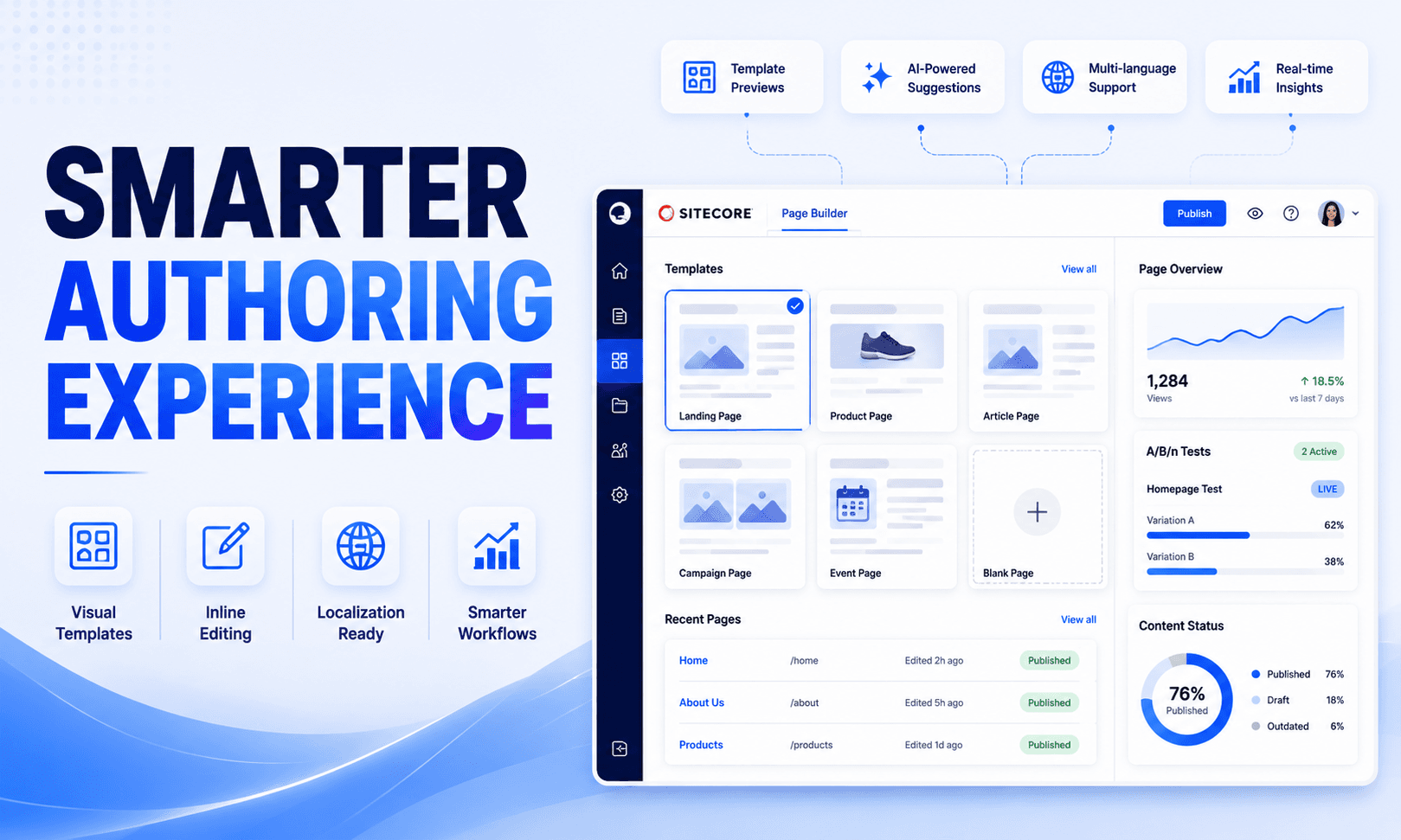
One of the most impactful improvements in this release is the support for custom thumbnails in Page Builder for page templates created from branch templates in Content Editor.
Previously, authors often had limited visual context when selecting templates. With this update, configured thumbnails now appear directly within Page Builder, enabling teams to:
- Quickly identify the correct template
- Reduce template selection errors
- Improve content creation efficiency
- Deliver a more visual and user-friendly authoring experience
For organizations managing large template libraries, this enhancement significantly improves discoverability and governance.

Create Content Faster, With Confidence
Empower authors with smarter workflows, visual template selection, accurate testing, streamlined localization, and safer inline editing in SitecoreAI.
Improved Navigation Consistency Across the Platform
Sitecore has also refined internal navigation behavior to create a more seamless in-app workflow.
Content Usage and Assign Content Item Dialog Updates
Links inside the Content Usage and Assign content item dialogs now open Content mode instead of redirecting users to Content Editor.
This small but strategic UX enhancement provides:
- Faster access to relevant content
- Reduced context switching
- A more modern and consistent editing experience
- Better workflow continuity for authors
By keeping users within the Page Builder ecosystem, Sitecore minimizes disruption and improves productivity.
Updated Language Configuration Paths
Upgrade Your Sitecore Authoring Experience
Localization management has also received an important update.
Language configuration links in Page Builder now correctly point to:
Localization → Configuration within the Sites dashboard.
This change reflects the platform’s evolving information architecture and helps teams:
- Locate language settings faster
- Simplify multilingual governance
- Reduce confusion caused by outdated navigation paths
For global organizations operating multilingual experiences, streamlined localization management is critical for maintaining publishing accuracy and operational efficiency.
More Accurate A/B/n Test Status Reporting
Experimentation and personalization workflows become more reliable with a fix to A/B/n test status handling.
What Was Fixed?
An issue previously allowed tests to display both LIVE and PENDING statuses simultaneously, creating confusion for marketers and optimization teams.
The update now ensures Page Builder derives a singleaccurate experiment status by combining:
- Personalize API status
- Page publish state
Why This Matters
This fix improves:
- Reporting accuracy
- Decision-making confidence
- Experiment monitoring
- Cross-team collaboration
Reliable status visibility is essential for organizations running high-volume optimization programs and personalization campaigns.
Improved Inline Editing Behavior
Sitecore also resolved issues affecting inline editing placeholders and text transformations.
Placeholder Rendering Fix
Inline editing placeholders are no longer impacted by component-level text-transform CSS styles.
This ensures the [No text in field] placeholder behaves correctly and clears properly during editing—particularly in Title components.
Prevention of Invalid Placeholder Content
Another critical fix prevents the [No text in field] placeholder from being accidentally saved as actual content in single-line text fields when Tailwind text-transform classes are applied.
This enhancement helps avoid:
- Incorrect preview rendering
- Unintended published content
- Data quality issues
- Authoring confusion
For teams using utility-first CSS frameworks like Tailwind, this update delivers a cleaner and more dependable editing experience.
Final Thoughts
This Page Builder release may appear incremental on the surface, but it delivers meaningful quality-of-life improvements that directly impact daily authoring workflows.
Key benefits include:
- Better visual template selection
- Cleaner navigation flows
- Improved localization management
- More reliable experiment statuses
- Safer inline editing behavior
Together, these updates reinforce Sitecore’s ongoing investment in creating a more intuitive, efficient, and enterprise-ready digital experience platform.
For organizations leveraging SitecoreAI and Page Builder extensively, these refinements can translate into measurable gains in productivity, accuracy, and editorial confidence.
Reference:
Improvements and resolved issues in Page builder
Frequently Asked Questions
What are the latest improvements in SitecoreAI Page Builder?
Recent SitecoreAI Page Builder improvements include visual custom thumbnails for page templates, updated localization configuration links, more accurate A/B/n experiment status information, and fixes that improve inline editing behavior.
How do custom template thumbnails improve Sitecore Page Builder?
Custom thumbnails provide visual previews of page templates, helping content authors identify and select the correct template faster and with greater confidence.
How does SitecoreAI improve content authoring workflows?
SitecoreAI improves authoring workflows by reducing unnecessary context switching, providing visual editing capabilities, supporting in-app content management, and continuously improving Page Builder usability.
What was fixed in SitecoreAI A/B/n experiment status?
A Page Builder issue that could show both LIVE and PENDING statuses at the same time was resolved so that a single experiment status is derived more accurately from personalization and page publishing information.
How does SitecoreAI support localization in Page Builder?
Page Builder includes localization-related workflows and configuration access that help enterprise teams manage languages and multilingual content more efficiently.
What improvements were made to SitecoreAI inline editing?
Inline editing issues involving text-transform CSS styles and empty-field placeholders were resolved to prevent placeholder text from being incorrectly saved as actual content.
Why are Page Builder improvements important for enterprises?
Continuous Page Builder improvements can help enterprise teams create content faster, reduce authoring errors, improve workflow consistency, support localization, and manage complex digital experiences more efficiently.
Can SitecoreAI Page Builder improve content quality?
Yes. Improvements to visual template selection, editing accuracy, localization workflows and experiment status information can help authors make more confident and accurate content decisions.
What is the difference between SitecoreAI Page Builder and traditional content editing?
SitecoreAI Page Builder provides a modern visual authoring experience where users can work directly with page content, components, layouts and supported content workflows in a more integrated interface.
Who benefits from SitecoreAI Page Builder improvements?
Content authors, marketers, digital experience teams, localization teams, developers, enterprise architects and organizations managing large or multilingual websites can benefit from improved Page Builder workflows.