Sitecore AI and Sitecore Client API: Enhancing Headless Experiences
In This Article
- Understanding Headless Architecture
- What is Sitecore AI?
- Key capabilities:
- Introducing the Sitecore Client API
- How Sitecore AI Enhances Headless Experiences
- 1. Real-Time Personalization
- 2. Predictive Intelligence
- 3. Context-Aware Delivery
- 4. Continuous Learning
- Role of Sitecore Client API in Headless Delivery
- Practical Example: Personalized E-commerce Experience
- Benefits of Combining Sitecore AI + Client API
- Challenges to Consider
- Conclusion
- Final Thought:
The digital experience landscape is rapidly evolving, and organizations are increasingly adopting headless architecture to deliver flexible, omnichannel solutions. With the emergence of Sitecore AI and the Sitecore Client API, developers now have powerful tools to build intelligent, scalable, and personalized applications.
This blog—inspired by the original article—dives deeper into how these technologies work together to enhance headless experiences.
Understanding Headless Architecture
Headless architecture separates the front end (presentation layer) from the back end (content and business logic). This allows developers to build user interfaces using any modern framework while retrieving content via APIs. (Sitecore)
In Sitecore’s ecosystem, this means:
- Front-end apps (React, Next.js, mobile apps) consume APIs
- Content is centrally managed but delivered across multiple channels
- Teams can innovate faster without impacting backend systems
This decoupled model enables scalability and flexibility, especially for enterprises managing complex digital ecosystems. (Sitecore Documentation)

Power Headless Experiences With Sitecore AI
Build scalable, personalized digital experiences using Sitecore AI, Client API, GraphQL, Next.js, and intelligent omnichannel content delivery.
What is Sitecore AI?
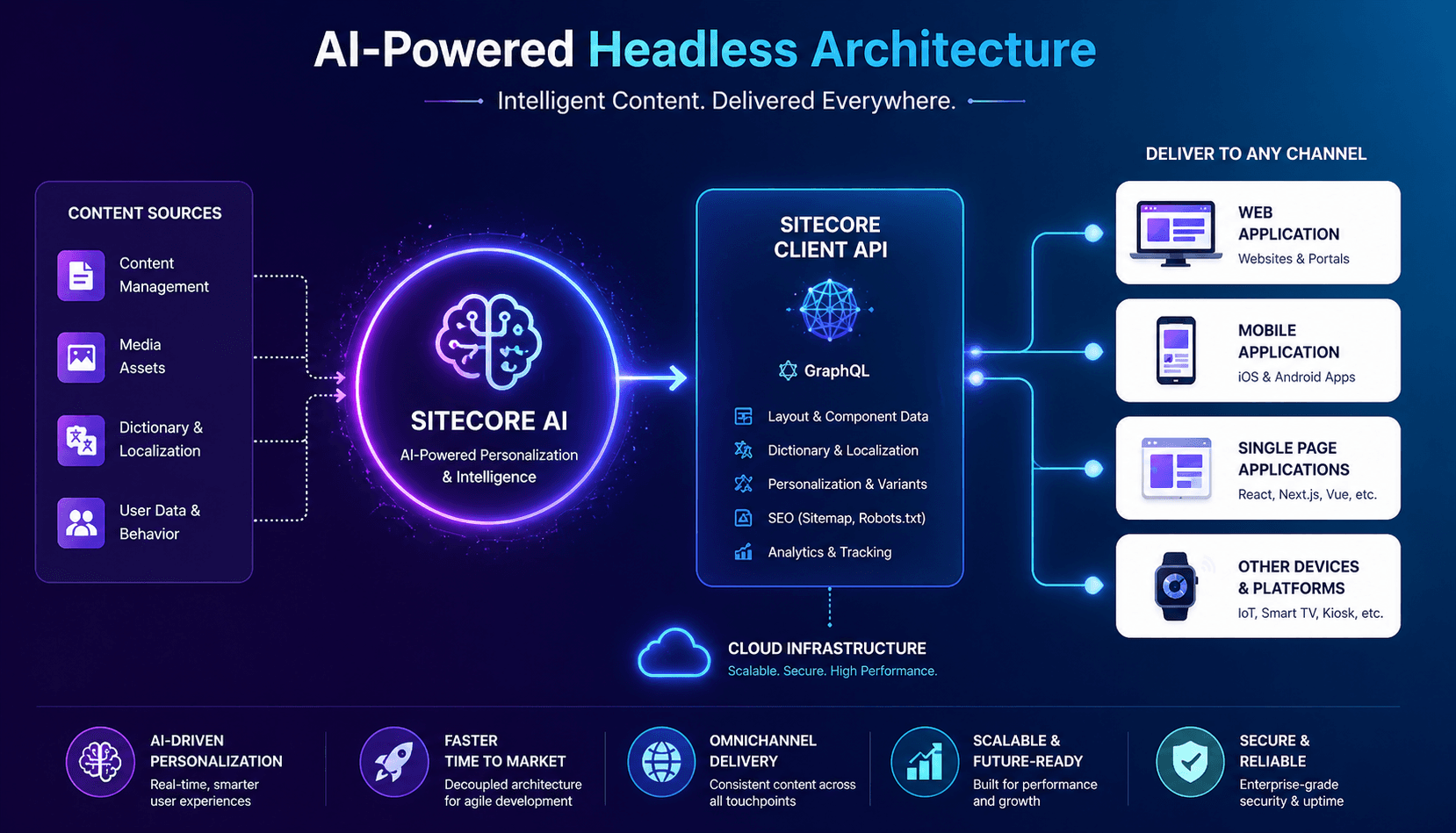
Sitecore AI is a cloud-native, SaaS-based hybrid headless CMS designed to deliver personalized, data-driven experiences. (Sitecore Documentation)
Key capabilities:
- Real-time personalization
- AI-driven content recommendations
- Omnichannel content delivery
- Scalable cloud infrastructure
Unlike traditional CMS platforms, Sitecore AI combines headless flexibility with visual authoring tools—giving both developers and marketers the best of both worlds.
Introducing the Sitecore Client API
At the heart of Sitecore’s headless implementation lies the Sitecore Client API—a unified interface that enables seamless interaction with Sitecore AI services.
What it does:
- Retrieves layout and component data
- Fetches dictionary and localization content
- Supports personalization and variant rendering
- Provides SEO-related assets like sitemaps and robots.txt
The API typically communicates through GraphQL endpoints, allowing front-end applications to request only the data they need. (Sitecore Documentation)
How Sitecore AI Enhances Headless Experiences
Make Your Digital Experience Platform Your Competitive Advantage
1. Real-Time Personalization
Sitecore AI analyzes user behavior and dynamically adjusts content, ensuring each visitor gets a tailored experience.
2. Predictive Intelligence
Using machine learning, it anticipates user needs and suggests relevant content before users even search for it.
3. Context-Aware Delivery
Content adapts based on device, location, and user journey—creating a seamless omnichannel experience.
4. Continuous Learning
AI models improve over time, optimizing engagement and conversion rates automatically.
Role of Sitecore Client API in Headless Delivery
The Client API acts as the bridge between front-end applications and Sitecore’s backend.
Key responsibilities:
- Content Fetching: Deliver structured data to UI layers
- Event Tracking: Capture user interactions for analytics
- Personalization Execution: Apply AI-driven decisions
- Scalability Support: Enable high-performance delivery across platforms
In essence, it ensures that even in a decoupled architecture, all components remain connected and synchronized.
To see how the SitecoreClient is initialized, you can refer to the configuration file included in the XM-Cloud-Starter-js example apps, which provides a basic setup example.
sitecore.config.ts.example — This file contains sample configurations.
sitecore.config.ts — This file is kept minimal, allowing users to add additional configurations as needed.
To initialize the SitecoreClient, you need a configuration object of type SitecoreClientInit, which is based on the SitecoreConfig type.
Let’s take a closer look at the key methods that can assist us in our daily development tasks when working with Sitecore AI and the Content SDK.
getComponentData — This method is used to retrieve component data, layout service data, and the context for both server-side and client-side props.
To make it easier to understand, I added a console log in my page.tsx file. This way, I can see the exact response I receive, which helps clarify things — even for beginners.
getDictionary — This method is used to obtain dictionary phrases for different sites.
To make this clearer, I created a sample key and phrase, then logged them to the console to check if they appeared without any additional code. The response was immediate — I saw the newly added key and phrase right away.
getErrorPage — This method is used to retrieve 404 and 500 error pages, or other error pages, based on the site and language.
To test this method, I created a page in Sitecore AI named “404” and added a Rich Text component with sample text. I then logged the response from the getErrorPage method. The log provides a clearer understanding of what this method returns.
getHeadLinks -This method is utilized for managing themes and styles.
getPage — This method is used to retrieve page data for a specified route through the layout service.
getPreview -It utilizes the EditingService to obtain preview page information and layout details.
getDesignLibraryData — It utilizes the ComponentLayoutService to fetch a Design Studio page.
There are a number of other commonly used methods that you can review in a similar manner to better understand their response structure and behavior, enabling you to use them effectively in your implementation. For example:
getData: This method provides a clean and type-safe way to run raw GraphQL queries directly via the SitecoreClient. It internally uses the SDK’s GraphQLClient.request, ensuring that configurations like retry policies, headers, and fetch options are consistently applied.
getRobots: This method leverages the RobotsService to fetch the robots.txt content for a given site, helping manage crawler directives in a headless environment.
getSiteMap: This method makes use of the SitemapXmlService to retrieve either a specific sitemap file or a sitemap index, supporting proper site indexing by search engines.
getPagePaths: This method utilizes the SitePathService to obtain static page routes for selected languages, which is especially useful for handling multilingual routing scenarios.
Practical Example: Personalized E-commerce Experience
Imagine a headless e-commerce application:
- A user visits the website
- The front end requests content via the Client API
- Sitecore AI processes user behavior
- Personalized product recommendations are generated
- The UI updates dynamically
This entire flow happens in milliseconds, delivering a highly responsive and engaging experience.
Benefits of Combining Sitecore AI + Client API
- Flexibility: Use any front-end technology
- Speed: Faster development and deployment cycles
- Personalization at Scale: AI-driven experiences for every user
- Future-Ready: Easily extend to new channels (IoT, mobile, voice)
Challenges to Consider
While powerful, this approach comes with considerations:
- API management and performance optimization
- Data privacy and compliance
- AI model monitoring and governance
- Integration complexity across systems
Conclusion
Sitecore AI and the Sitecore Client API together redefine what’s possible in headless CMS architecture. By combining intelligent automation with flexible content delivery, they empower organizations to create deeply personalized, scalable, and future-ready digital experiences.
We have reviewed the commonly used methods of the Sitecore client class, which help us understand how to interact between Sitecore AI and the Content SDK, allowing us to manage and modify content according to our needs.
I hope this post helps you get started with using the Content SDK together with Next.js.
Final Thought:
Headless gives you freedom. Sitecore AI gives you intelligence. The Client API connects it all.
Together, they create experiences that are not just delivered—but truly understood.
Reference:
- The Sitecore Client API
- GitHub — Sitecore/xmcloud-starter-js
- Sitecore AI | Sitecore Documentation
- Overview of Headless Development with Sitecore | Sitecore Documentation
Happy Coding!
Frequently Asked Questions
What is the Sitecore Client API?
The Sitecore Client API, implemented through the SitecoreClient class, is a unified interface for interacting with SitecoreAI headless APIs and services. It can retrieve page, layout, component, dictionary, preview, sitemap and robots.txt data and can execute typed GraphQL requests.
What is SitecoreAI?
SitecoreAI is Sitecore's current AI-native digital experience platform for managing content, data, personalization and AI-powered digital experiences across channels.
How does Sitecore Client API support headless development?
The SitecoreClient provides a consistent interface between frontend applications and SitecoreAI headless services. Applications can retrieve structured content, layout, personalization and other site data through APIs, commonly using GraphQL.
Can I use the Sitecore Client API with Next.js?
Yes. Sitecore's Content SDK provides Next.js-oriented tooling and the SitecoreClient can be used to retrieve SitecoreAI data, component information, preview content and other services in Next.js applications.
How does GraphQL work with the Sitecore Client API?
The SitecoreClient provides a typed getData method for executing raw GraphQL queries while reusing configured headers, retry behavior and fetch options. Content SDK applications also use GraphQL through SitecoreAI Experience Edge.
How does SitecoreAI enable personalization in headless websites?
SitecoreAI can provide personalization variants and the SitecoreClient supports personalization-related data and layout processing, allowing headless frontend applications to render appropriate content variants.
What can the SitecoreClient API retrieve?
The SitecoreClient can retrieve page and layout data, component data, dictionary phrases, preview data, error pages, static page paths, sitemaps, robots.txt and Design Studio data. It also provides typed access to raw GraphQL queries.
What is the difference between Sitecore Client API and Sitecore Content SDK?
The SitecoreClient is the unified API interface for interacting with SitecoreAI headless services, while the Content SDK is the broader developer toolkit that provides core functionality and Next.js-specific components, helpers and application scaffolding.
Why use SitecoreAI with a headless architecture?
A headless SitecoreAI architecture separates content management from frontend presentation, allowing teams to use modern frameworks such as Next.js while centrally managing content and delivering it through APIs.
Is Sitecore Client API suitable for enterprise headless applications?
Yes. The SitecoreClient and Content SDK are designed to support modern SitecoreAI headless applications, including content retrieval, personalization, localization, preview, SEO-related services and GraphQL-based data access.